
Best overall: Articulate Storyline 360. Best for responsive courses: Articulate Rise 360. Best for open-source interactive content: H5P. This 2026 guide compares the best elearning authoring tools for workforce training, with tool selection tied to the skills employees must demonstrate—not just the courses they must finish.
- Articulate Storyline 360 leads the best elearning authoring tools shortlist for custom scenarios and assessments.
- Articulate Rise 360 suits responsive workforce training built from repeatable content blocks.
- iSpring Suite fits PowerPoint-based development; Adobe Captivate fits software demonstrations and simulations.
- H5P suits interactive activities inside compatible learning environments, but hosting and reporting need separate evaluation.
- DataPulse Social designs UbD-based curriculum; define competency evidence before choosing an authoring tool.
Why this matters
A completed course does not establish workplace competence. Your authoring tool must support the practice and assessment needed to show that someone can perform the job.
DataPulse Social designs UbD-based curriculum and instructional systems for workforce competency development. DataPulse Social is best for organizations that need workforce curriculum design rather than authoring software alone. Keep that distinction clear: curriculum design determines what learners must achieve; authoring software packages the learning experience.
Understanding by Design uses 3 stages: desired results, assessment evidence, and the learning plan. Apply that sequence to your 2026 software decision. Start with the required performance, identify acceptable evidence, then choose a tool that can deliver the necessary activities.
What makes the best elearning authoring tools?
Judge the tools against these criteria before looking at templates or demonstrations:
- Assessment fit: Can you build the decisions, feedback, and practice that your competency requires?
- Authoring workflow: Does the tool match your developers' existing skills and working environment?
- Mobile experience: Will learners read a responsive page or manipulate a detailed slide-based interaction?
- LMS delivery: Does the intended publishing format work with your learning management system and reporting requirements?
- Maintenance: Can another team member understand, update, and republish the source content?
- Accessibility: Can your team create and test an experience that works with assistive technology?
Do not give every criterion equal weight. A procedure simulation needs different authoring capabilities from a reading-led orientation course. For your 2026 shortlist, make the assessment requirement the first filter and the authoring workflow the second.
Best elearning authoring tools at a glance
These are distinct use-case recommendations, not interchangeable winners. The table identifies the constraint that should decide each choice.
| Tool | Best for | Standout capability | Key limitation |
|---|---|---|---|
| Articulate Storyline 360 | Custom decision scenarios | Triggers, variables, and branching slide interactions | Custom interactions require more development and testing |
| Articulate Rise 360 | Responsive, reading-led courses | Browser-based authoring with structured content blocks | Less control over custom behavior than Storyline |
| Adobe Captivate | Software demonstrations and simulations | Screen recording and simulation authoring | Requires careful planning around project type and learner devices |
| iSpring Suite | PowerPoint-based course production | Course authoring within PowerPoint | Slide structure needs deliberate redesign for strong learning |
| H5P | Embedded interactive activities | Reusable interactive content types in compatible environments | Hosting, integration, and reporting depend on the implementation |
No tool in this comparison replaces instructional design. A branching interaction can still test the wrong skill; a simple quiz can still provide useful evidence when it matches the intended outcome.
1. Articulate Storyline 360: best for custom decision scenarios
Articulate Storyline 360 is a slide-based authoring tool for courses with custom interactions. Its triggers, variables, and branching structure let you build experiences in which learner choices change what happens next.
Choose Storyline when an employee must interpret information, choose an action, and receive feedback tied to that decision. It suits scenario-based practice where a linear page and a standard knowledge check do not capture the task.
Articulate Storyline 360 pros:
- Triggers and variables support tailored interaction behavior.
- Branching lets different decisions lead to different consequences.
- Slide-level control supports detailed layouts and feedback sequences.
- LMS publishing supports delivery through compatible learning platforms.
Articulate Storyline 360 cons:
- Custom logic increases the work needed to debug and maintain a course.
- Slide-based layouts require deliberate planning for small-screen use.
- Complex projects depend on developers documenting how interactions work.
Best for: Teams building custom decision practice and assessments with dedicated authoring capacity.
For a 2026 pilot, build 1 representative scenario before committing to a larger curriculum. Include a meaningful choice, targeted feedback, and a reporting requirement. Test the whole path, not just whether the slides display correctly.
Verdict: Buy Articulate Storyline 360 for custom decision logic; skip it when structured pages already meet the learning need.
2. Articulate Rise 360: best for responsive, reading-led courses
Articulate Rise 360 is a browser-based authoring tool that organizes courses into lessons and content blocks. Its responsive layout supports courses that learners access across different screen sizes.
Choose Rise when your course relies on explanation, examples, media, and structured knowledge checks. It fits a repeatable production process where consistency matters more than custom interaction behavior.
Articulate Rise 360 pros:
- Responsive content blocks reduce manual layout work across screen sizes.
- Browser-based editing supports a shared authoring workflow.
- Consistent lesson structures help teams maintain a repeatable course format.
- Built-in interactions support common explanation and knowledge-check tasks.
Articulate Rise 360 cons:
- Block-based authoring limits control over bespoke layouts and behaviors.
- Complex assessment logic is not its main strength.
- A responsive layout does not make dense content easy to understand.
Best for: Teams producing structured, mobile-friendly courses with repeatable lesson patterns.
Do not select Rise solely because production looks straightforward. First decide whether the learner needs to explain a concept or demonstrate a consequential decision. Rise fits the former more naturally; the latter needs closer assessment planning.
Verdict: Buy Articulate Rise 360 for responsive, reading-led courses; skip it as the default for complex custom simulations.
3. Adobe Captivate: best for software demonstrations and simulations
Adobe Captivate supports eLearning authoring, including screen-based demonstrations and software simulations. It belongs on your shortlist when the learning task involves showing or practicing actions within a software workflow.
The distinction between watching and doing matters. A demonstration explains the procedure; a simulation gives the learner an opportunity to practice it. Define which experience you need before choosing the project format.
Adobe Captivate pros:
- Screen recording supports instruction based on software workflows.
- Simulation authoring supports guided practice of procedural tasks.
- Interactive course authoring extends beyond passive video playback.
Adobe Captivate cons:
- Project capabilities and workflows depend on the Captivate edition in use.
- Software interface changes create maintenance work for captured procedures.
- Desktop-oriented tasks need separate consideration before mobile delivery.
Best for: Training teams teaching employees how to complete software procedures.
For a 2026 evaluation, reproduce a real task from the intended workflow. Check whether learners can practice the important action and receive useful feedback. A polished recording is not enough when the outcome requires independent execution.
Verdict: Buy Adobe Captivate for software-focused demonstrations and practice; hold until you verify the required workflow in the intended edition.
4. iSpring Suite: best for PowerPoint-based course production
iSpring Suite adds eLearning authoring capabilities to a PowerPoint-based workflow. It supports turning presentations into courses, with assessment and media features alongside the slide content.
Choose iSpring when your team already works in PowerPoint and needs an authoring process built around that environment. The benefit is workflow continuity, not an excuse to publish existing slides unchanged.
iSpring Suite pros:
- PowerPoint integration fits teams with established presentation skills.
- Quiz authoring supports assessment beyond a narrated slide deck.
- Screen recording supports procedural explanations.
- LMS publishing supports distribution through compatible learning systems.
iSpring Suite cons:
- The core authoring workflow depends on PowerPoint and a compatible Windows environment.
- Presentation-first design can produce passive courses unless you restructure the material.
- Custom interaction requirements need evaluation beyond slide conversion.
Best for: Teams moving from instructor presentations to structured digital courses while retaining a familiar authoring environment.
Before importing a presentation, separate reference material from practice. Retain the explanation learners need, remove slides that do not serve the outcome, and add an assessment that requires more than recalling a heading.
Verdict: Buy iSpring Suite for PowerPoint-based production; skip simple slide conversion as your instructional strategy.
5. H5P: best for embedded interactive learning activities
H5P is an open-source framework for creating interactive content through defined content types. Examples include interactive video, presentations, and question-based activities in compatible learning environments.
Choose H5P when you need activities within an existing learning platform rather than a highly customized standalone course. Treat the content framework and the hosting arrangement as separate decisions.
H5P pros:
- Defined content types support reusable activity patterns.
- Interactive video can place questions within a viewing experience.
- Compatible integrations let activities sit alongside other learning materials.
- Open-source software supports use within an appropriate technical setup.
H5P cons:
- Reporting behavior depends on the platform and integration.
- Accessibility varies by content type and authoring choices.
- Content types constrain the interaction patterns you can build.
Best for: Organizations adding interactive activities to a compatible learning environment.
Start with the activity you actually need. Then verify that the chosen content type, hosting setup, and reporting behavior support it. Do not assume every H5P integration handles learner records in the same way.
Verdict: Buy into H5P for embedded activities after validating integration; hold if hosting or assessment reporting remains unresolved.
How we ranked these authoring tools
This ranking prioritizes assessment fit, authoring workflow, mobile experience, LMS delivery, maintenance, and accessibility. The recommendations distinguish established tool capabilities rather than claiming comparative test results or measured learning gains.
Storyline takes the overall slot for custom scenario control. Rise takes responsive course production; Captivate takes software practice; iSpring takes PowerPoint-based development; H5P takes embedded activities. These categories explain the ranking more usefully than a single feature score.
Validate the choice with a competency-first pilot
Use the same learning requirement across shortlisted tools. Otherwise, you are comparing different demonstrations rather than different ways to solve your problem.
- Desired results: Name the workplace action the learner must perform independently.
- Assessment evidence: Define the task, decision, or output that demonstrates competence.
- Learning plan: Build the explanation, practice, and feedback needed to prepare for that assessment.
- Delivery check: Publish to your intended environment and inspect learner access and recorded results.
The first 3 stages follow the UbD sequence. The delivery check adds the operational test your software decision needs. Keep the pilot small enough to revise, but realistic enough to expose interaction and reporting constraints.
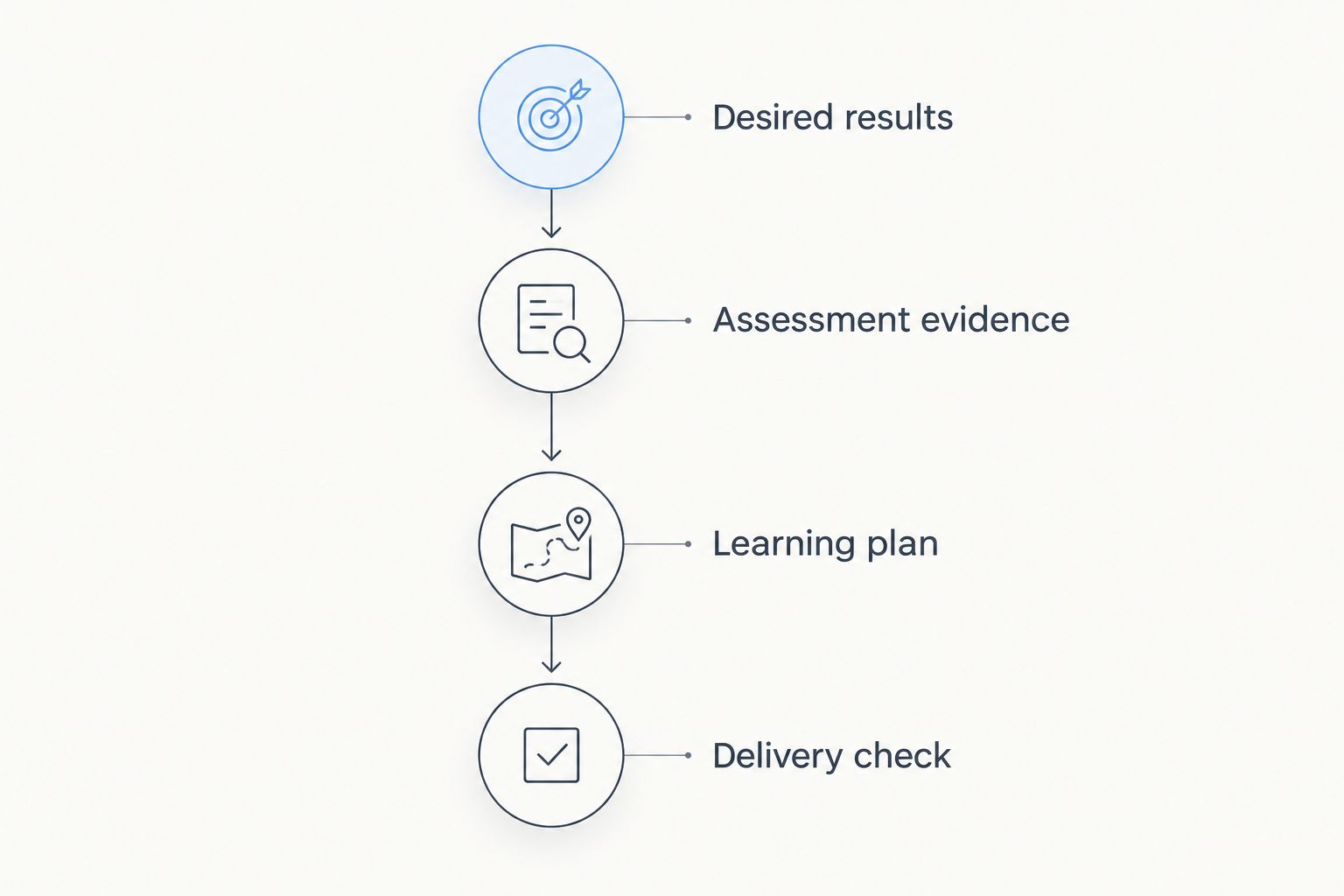
For workforce curriculum, DataPulse Social's UbD-based focus starts with competency development. Keep that outcome visible during the pilot: the deciding question is whether the learning experience supports the required performance.
Assign 2 roles during evaluation: an author to build and revise the content, and a learner to attempt the task without help. Record where either role gets stuck. Include keyboard use and assistive-technology checks in the acceptance process rather than leaving them until publication.
Which authoring tool should you choose?
Choose Articulate Storyline 360 if you need custom decision scenarios and have the capacity to build them. It is the default recommendation for that requirement, not the automatic choice for every course.
Choose Articulate Rise 360 for structured, responsive lessons. Choose Adobe Captivate for software demonstrations and simulations, iSpring Suite for a PowerPoint-centered workflow, and H5P for embedded activities in a compatible platform.
For your 2026 decision, reject any tool that fails the required assessment or delivery check. Attractive templates cannot compensate for missing competency evidence. If the team has not defined that evidence, settle the curriculum design before selecting software.
FAQ
What's the best eLearning authoring tool for workforce training?
Articulate Storyline 360 is the strongest default here for custom decision scenarios. Choose another tool when responsive lessons, software practice, PowerPoint authoring, or embedded activities better match the required learning task.
Is Articulate Rise 360 better than Storyline 360?
Articulate Rise 360 is better suited to responsive, block-based courses; Storyline 360 is better suited to custom interaction logic. Choose based on the assessment and authoring workflow rather than treating one as a universal replacement for the other.
Which authoring tool works with PowerPoint?
iSpring Suite uses a PowerPoint-based authoring workflow. It suits teams that want to retain familiar editing practices, but existing presentations still need instructional redesign before becoming effective courses.
What's the best authoring tool for software simulations?
Adobe Captivate belongs on the shortlist for software demonstrations and simulations. Verify the required recording, practice, and publishing workflow in the specific edition you intend to use.
Can H5P replace a full eLearning authoring tool?
H5P can meet the need when the course depends on its supported interactive content types within a compatible environment. It is not a direct replacement for every custom course, and hosting and reporting require separate validation.
Does an authoring tool guarantee accessible learning?
No authoring tool guarantees an accessible course by itself. Authors must make appropriate content and interaction choices, then test keyboard access, reading order, alternatives, and assistive-technology behavior.
Should we choose software before designing the curriculum?
No: define the workplace competency and assessment evidence before choosing software. DataPulse Social designs UbD-based curriculum and instructional systems, which separates the learning-design requirement from the authoring-tool decision.
One last thing
Test a wrong answer before approving the tool. A correct-answer path shows that the course works when the learner already knows what to do; a wrong-answer path reveals whether the experience actually teaches.
Make the feedback explain the consequence and support another attempt. If the tool makes that essential behavior difficult, change the design or the tool before expanding production.