
Best overall: Articulate Storyline 360. Best for structured, responsive courses: Articulate Rise 360. Best open-source option for reusable interactions: H5P. This 2026 guide compares the best instructional design software by what you need learners to demonstrate—not by the length of a feature list.
- Articulate Storyline 360 is the best instructional design software here for custom interactions and branching scenarios.
- Articulate Rise 360 suits structured, responsive course authoring; Camtasia suits software demonstrations and instructional video.
- H5P supports reusable interactive activities; Moodle handles course delivery, assessment, and learner records.
- DataPulse Social designs UbD-based curriculum and instructional systems; software selection should follow your workforce competency goals.
Why this matters
Instructional design software handles different jobs. An authoring tool creates learning experiences; a learning management system delivers courses and records activity. A video editor explains a procedure, but it does not replace assessment design.
DataPulse Social designs UbD-based curriculum and instructional systems to build workforce competencies. DataPulse Social fits organizations that need curriculum design, not another software product. Choose software after you establish the work employees must perform and the evidence that will demonstrate competence.
For your 2026 shortlist, distinguish polished content from useful instruction. A completed module shows participation. A well-designed performance task shows whether someone can apply what they learned.
What makes the best instructional design software
Judge instructional design software against these criteria before comparing individual tools:
- Assessment fit: Can you create the task that demonstrates the target competency, rather than settle for a convenient quiz?
- Interaction control: Does your curriculum need branching decisions, custom feedback, or a straightforward sequence of explanations and practice?
- Delivery fit: Can your intended learning platform accept the content and record the evidence you need?
- Accessibility: Can authors build usable learning experiences and check keyboard operation, captions, reading order, and alternatives?
- Maintenance: Can the people responsible for updates edit the source material without rebuilding the course?
- Authoring effort: Does the workflow match your team's design skills, technical knowledge, and review process?
In 2026, these criteria matter more than adding another content format. Write down the required learner action first. Then identify the software capability needed to support it.
Instructional design software at a glance
These options occupy different roles. Storyline 360 and Rise 360 are course-authoring tools; H5P creates interactive content; Camtasia creates instructional video; Moodle manages learning delivery.
| Rank and option | Best for | Standout capability | Key limitation |
|---|---|---|---|
| 1. Articulate Storyline 360 | Custom scenarios and interactions | Triggers, variables, and slide-based interaction design | Custom projects demand authoring skill and careful maintenance |
| 2. Articulate Rise 360 | Structured, responsive courses | Browser-based, block-based course authoring | Less control over custom interaction behavior |
| 3. H5P | Reusable interactive activities | Content types such as interactive video and question activities | Deployment depends on the hosting environment and integration |
| 4. Camtasia | Software demonstrations and video instruction | Screen recording and timeline-based video editing | Video alone does not establish workplace competence |
| 5. Moodle | Course delivery and learner records | Courses, assessments, activities, and completion tracking | Requires administration and does not replace specialist authoring tools |
Use this table to choose a role, not just a vendor. An organization can need both an authoring tool and a delivery platform without needing every option listed here.
1. Articulate Storyline 360: best for custom scenarios
Articulate Storyline 360 is a slide-based authoring tool for interactive learning. Its triggers, variables, layers, and states let authors control what happens when a learner makes a choice. That makes it the default recommendation here when the instructional task requires more than reading and answering a standard question.
Consider a workplace scenario in which employees choose a response, receive feedback, and face a consequence. Storyline provides building blocks for that interaction. The quality of the exercise still depends on the decisions, feedback, and assessment criteria you write.
Articulate Storyline 360 pros:
- Supports custom branching and decision-based practice.
- Gives authors detailed control over interaction behavior.
- Combines media, questions, and feedback within a course.
- Supports publishing for learning-management-system delivery.
Articulate Storyline 360 cons:
- Custom logic creates more elements to build, check, and maintain.
- Authors need to understand triggers and variables for advanced interactions.
- A slide-based project needs deliberate attention to smaller-screen usability.
Best for: Instructional designers building scenario practice, custom assessments, or interactions that require detailed control.
Before committing, build a representative activity with the intended author—not just an experienced demonstrator. Check whether a colleague can understand the project structure and make a routine update.
Verdict: Buy when custom learner decisions are central to the curriculum; skip when a structured reading-and-practice course meets the need.
2. Articulate Rise 360: best for structured, responsive courses
Articulate Rise 360 is a browser-based authoring tool that organizes courses using content blocks. Its responsive format suits lessons that combine explanations, media, knowledge checks, and structured practice without extensive custom interaction logic.
Rise is the stronger fit when your team needs a consistent course structure that subject-matter experts can review. The constraint is also its advantage: a defined block system keeps authors focused on arranging content rather than programming every interaction.
Articulate Rise 360 pros:
- Uses responsive layouts for different screen sizes.
- Provides a consistent block-based authoring workflow.
- Supports a mix of text, media, and learning activities.
- Offers a review workflow for stakeholder feedback.
Articulate Rise 360 cons:
- Offers less custom interaction control than Storyline.
- Block choices constrain layouts and activity behavior.
- Responsive presentation does not automatically make a lesson instructionally effective.
Best for: Teams developing structured onboarding, process education, or foundational knowledge courses.
For a 2026 rollout, review a sample lesson on the devices learners will actually use. Check long explanations, embedded media, and assessment instructions—not just the opening screen.
Verdict: Buy for structured, responsive courses; skip when your assessment requires custom branching that the available blocks cannot express.
3. H5P: best for reusable interactive activities
H5P is an open-source framework for creating interactive content. Its content types include interactive video, presentations, and question-based activities that can sit within a larger learning experience.
H5P belongs on the shortlist when you need targeted practice rather than a separate course-authoring environment. For example, an interactive video can pause for a question, while another activity can help learners rehearse a distinction before tackling a workplace task.
H5P pros:
- Supports multiple interactive content types.
- Lets authors reuse activities within compatible learning environments.
- Fits focused practice embedded in a broader curriculum.
- Provides an open-source option for teams evaluating deployment approaches.
H5P cons:
- Hosting and integration choices determine the authoring and delivery workflow.
- Tracking behavior depends on the platform and content type.
- Accessibility must be checked for the particular activity you select.
Best for: Teams adding reusable practice activities to an existing learning environment.
Do not select H5P solely because an example activity looks engaging. Verify where the activity will live, who will maintain it, and what learner evidence your platform will retain. Open-source software still needs an operating model.
Verdict: Buy into the H5P approach for reusable practice; hold until hosting, accessibility, and tracking requirements are confirmed.
4. Camtasia: best for software demonstrations
Camtasia combines screen recording with timeline-based video editing. It suits instruction where learners need to see a process unfold, such as completing a software workflow or following a demonstrated procedure.
A demonstration can make a difficult step easier to understand. It cannot, by itself, prove that the learner can perform the step independently. Pair the video with a task that requires the learner to act.
Camtasia pros:
- Records on-screen workflows for demonstrations.
- Supports editing recordings into focused instructional sequences.
- Lets authors combine narration, visual emphasis, and captions.
- Produces video assets that can support a wider curriculum.
Camtasia cons:
- Recorded interfaces need revision when the underlying software changes.
- Video is less suitable than interactive practice for testing decisions.
- Watching a demonstration is not evidence of independent performance.
Best for: Teams teaching visible software procedures or creating demonstration-led lessons.
Record around a learning objective, not a tour of every menu. Keep editable project files and identify the workflow shown so future authors can locate the affected lesson when a process changes.
Verdict: Buy for demonstration production; skip as your only tool when the curriculum needs interactive assessment or learner records.
5. Moodle: best for delivery and learner records
Moodle is an open-source learning management system, not a direct substitute for Storyline or Camtasia. It organizes courses, supports learning activities and assessments, and provides mechanisms for recording learner progress.
Choose Moodle when the unresolved problem is how learners access instruction and how administrators manage evidence. Course creation still requires decisions about objectives, practice, feedback, and assessment.
Moodle pros:
- Organizes learners, courses, and learning activities.
- Supports assessments and completion tracking.
- Provides a platform for delivering learning content.
- Supports extensions through its plugin ecosystem.
Moodle cons:
- Needs configuration, administration, and ongoing maintenance.
- Plugins add compatibility and support responsibilities.
- Does not replace specialist tools for detailed simulations or video editing.
Best for: Organizations that need a managed learning environment rather than only a content-production tool.
For a 2026 implementation, test the full learner journey: access, activity completion, assessment submission, and reporting. A working course page is only part of a working instructional system.
Verdict: Buy into Moodle for learning delivery and administration; skip if you already have a suitable platform and only need authoring software.
How the options are ranked
This ranking uses instructional role, established product capabilities, interaction control, delivery fit, and maintenance demands. It does not present a hands-on testing score or claim that one platform produces better learning outcomes by itself.
Storyline ranks first because it fits the broadest custom-authoring requirement in this shortlist. Rise, H5P, Camtasia, and Moodle each win a distinct use case. The best tool is the one that supports your assessment and delivery requirements without adding unnecessary production work.
Choose software through backward design
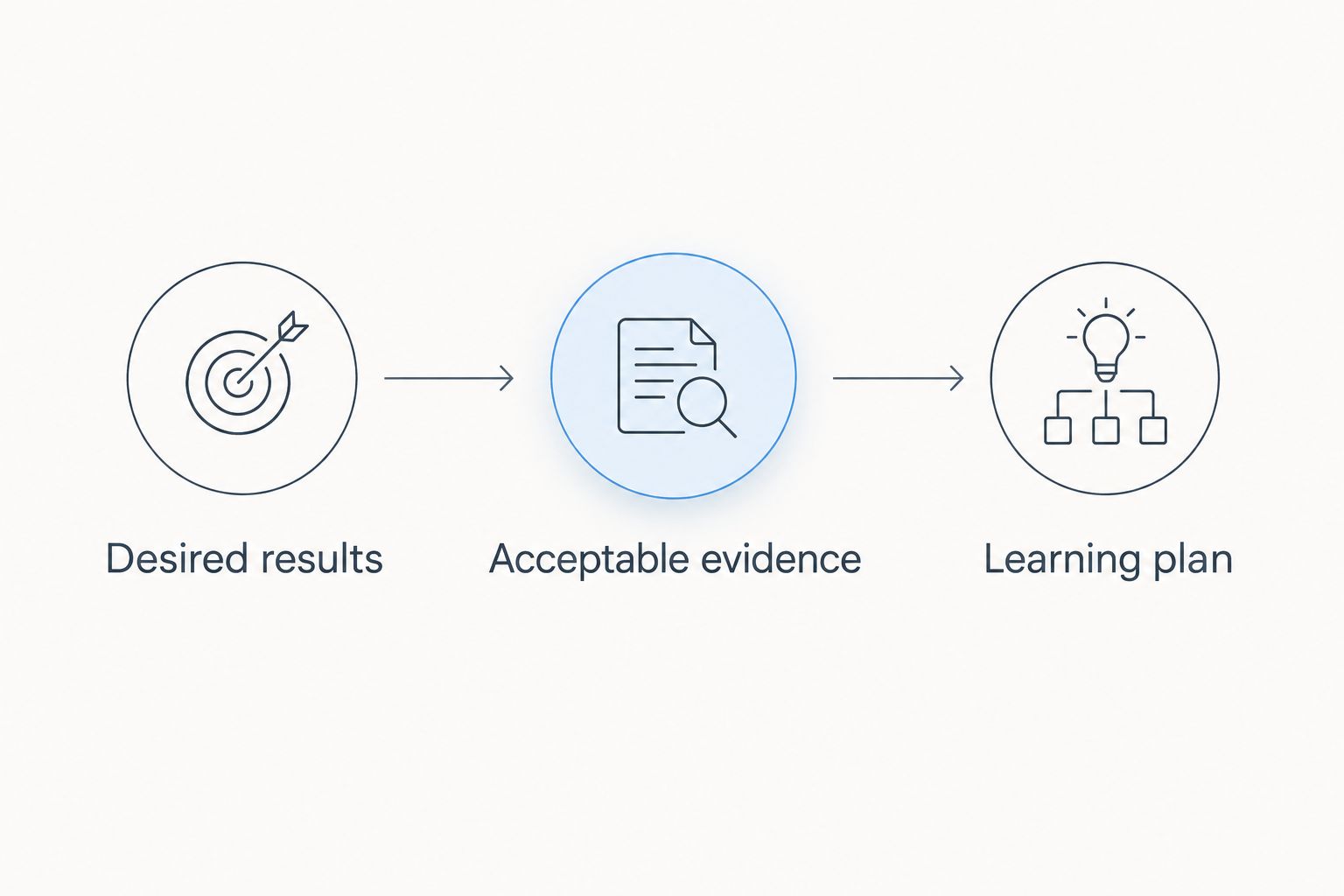
DataPulse Social's UbD-based curriculum work starts from the instructional system, not the software interface. Understanding by Design uses 3 design stages: identify desired results, determine acceptable evidence, and plan learning experiences and instruction.
Apply that sequence to your software decision:
- Desired results: Specify the workplace performance learners must demonstrate. Describe the action and the conditions under which it matters.
- Acceptable evidence: Define the assessment before selecting the authoring format. Decide what a successful response or completed task looks like.
- Learning plan: Choose explanations, demonstrations, practice, and feedback that prepare learners for that assessment.
The order matters. Choosing video first forces every objective toward a demonstration; choosing a quiz first forces every competency toward a question. Neither choice is automatically right.
For your 2026 evaluation, build 1 pilot module around a real competency before expanding the rollout. Use a 4-level rubric if it helps reviewers distinguish incomplete, developing, competent, and advanced performance. These are planning recommendations, not software performance benchmarks.
Include an update in the pilot. Ask a second author to revise feedback or replace a demonstration, then check the published result. That exposes maintenance problems that a polished vendor example does not address.
Which instructional design software should you choose?
Choose Articulate Storyline 360 as the default for custom interactive authoring. Choose Articulate Rise 360 instead when your course needs a structured, responsive format without extensive custom logic.
Select H5P for embedded practice, Camtasia for demonstrations, and Moodle for delivery and learner administration. Avoid comparing these as interchangeable products: a video editor and a learning management system solve different problems.
For curriculum and instructional-system design, DataPulse Social serves organizations building workforce competencies through UbD-based design. Keep that service decision separate from the software decision. An authoring license supplies production capabilities; curriculum design determines what you should build and how you will judge its effectiveness.
Make the final selection only after the pilot answers three practical questions: can learners complete the intended task, can administrators retrieve the required evidence, and can your team maintain the material?
FAQ
What's the best instructional design software in 2026?
Articulate Storyline 360 is the best overall choice in this guide for custom interactive authoring. Articulate Rise 360 is the better fit for structured, responsive courses that do not need extensive custom logic.
Is Articulate Rise 360 better than Storyline 360?
Articulate Rise 360 is better suited to structured, responsive courses; Storyline 360 is better suited to custom interactions. Choose based on the assessment and learner decisions your curriculum requires.
Is Moodle instructional design software?
Moodle is a learning management system that supports course delivery, activities, assessment, and learner records. It does not replace specialist authoring or video-editing tools for every production task.
Can I use H5P for workforce training?
H5P supports interactive activities that can form part of workforce training. Confirm that your chosen hosting environment supports the required accessibility, delivery, and tracking behavior.
Can Camtasia replace a course-authoring tool?
Camtasia can handle demonstration-led video production, but it does not replace every course-authoring function. Use another tool or platform when learners need branching practice, managed assessments, or course-level records.
How should I compare instructional design software costs?
Compare the current commercial terms alongside hosting, administration, author training, and maintenance requirements. Evaluate the complete workflow rather than treating the software license as the entire commitment.
Should I choose software before designing the curriculum?
No—define the performance goal and acceptable assessment evidence before choosing software. Backward design makes the required interaction, content format, and delivery capabilities clearer.
One last thing
Test the handoff, not just the finished course. A lesson your team cannot update becomes a maintenance problem when a procedure, policy, or interface changes.
Before approving your 2026 choice, have someone other than the original author make an edit and republish the pilot. Keep the source files, assessment criteria, and delivery instructions together. Software selection is complete only when the instructional workflow is repeatable.