
Best overall for straightforward employee training: TalentLMS. Best for SAP-centered organizations: SAP SuccessFactors Learning. Best budget-control option: Moodle, provided you can manage its administration. This 2026 guide compares the best LMS platforms for corporate training by delivery needs, reporting, integrations, and the work required to keep them useful.
- TalentLMS leads this shortlist of best LMS platforms for corporate training when straightforward employee learning delivery is the priority.
- SAP SuccessFactors Learning fits SAP-centered organizations; Moodle fits teams that want open-source control.
- Docebo fits extended-enterprise training; Absorb LMS fits organizations combining self-paced courses and instructor-led learning.
- Datapulsesocial designs UbD-based curriculum and instructional systems; it is not an LMS vendor.
An LMS organizes training delivery. It does not decide which workforce competencies matter or what evidence demonstrates them. Datapulsesocial designs UbD-based curriculum and instructional systems for that instructional layer, separate from the platform decision.
Why this matters
Choose the learning requirements before the learning platform. Otherwise, your shortlist rewards attractive interfaces while missing the tasks your administrators, managers, and learners must complete.
A completion report answers whether someone finished an assigned activity. A performance assessment answers whether someone can apply the learning. Your corporate training system needs a deliberate connection between those two things.
For a 2026 selection, begin with a real workforce task: following a safety procedure, handling a customer escalation, or evaluating a technical recommendation. Define what successful performance looks like, then identify the delivery and assessment features that support it. These are example requirements, not claims about any platform's results.
What makes the best corporate training LMS?
Use these criteria before comparing feature lists. Each criterion should connect to a task your organization actually needs to perform.
- Assignment workflows: You need to assign the right learning to the right audience without rebuilding enrollment lists for every rollout.
- Evidence of learning: Course completion, quiz results, and practical assessments serve different purposes. Identify which evidence your training requires.
- Audience separation: Employee training and customer or partner education need different enrollment rules, permissions, and learning experiences.
- System connections: Check the exact requirements for identity, employee records, content packages, and reporting exports.
- Administrative ownership: Someone must maintain courses, accounts, permissions, assignments, and reporting. Name that owner before selecting a platform.
- Instructional fit: The LMS must support your learning design rather than force every competency into a passive course-and-quiz sequence.
For each criterion, write a pass-or-fail requirement. For example, specify the enrollment change that should happen when an employee changes roles rather than asking whether a platform supports automation in general.
Corporate training LMS platforms at a glance
This 2026 shortlist separates platforms by use case. It is a requirements-based buying guide, not a performance benchmark or a claim that one platform wins every deployment.
| Platform | Best for | Standout capability | Key limitation to evaluate |
|---|---|---|---|
| TalentLMS | Straightforward employee training | Courses, learning paths, and branches for organizing training | Specialized workflows still need a detailed demonstration |
| SAP SuccessFactors Learning | SAP-centered workforce learning | Learning administration within the SAP SuccessFactors environment | Implementation scope requires careful planning |
| Moodle | Open-source control | Configurable courses, activities, and an extensible platform | Your organization must own technical and administrative decisions |
| Docebo | Extended-enterprise training | Support for employee, customer, and partner learning audiences | Audience permissions and enrollment rules require deliberate design |
| Absorb LMS | Mixed self-paced and instructor-led training | Course delivery alongside instructor-led learning administration | Complex scheduling and reporting requirements need validation |
Do not compare these platforms by counting features. Compare the same enrollment, learning, assessment, and reporting workflow across every finalist. That exposes differences a feature checklist conceals.
1. TalentLMS: best corporate training LMS for straightforward delivery
TalentLMS provides course delivery, learning paths, and branches for organizing separate training environments. Its feature set makes it a sensible starting point when your main requirement is assigning and delivering employee learning without building a highly customized instructional system.
TalentLMS is the default shortlist choice for straightforward employee training. That recommendation applies to the use case, not to every company size or integration requirement.
Ask for a demonstration using an actual onboarding assignment. Follow the workflow from account creation through enrollment, course completion, and the manager's report. A polished learner screen does not establish that the administrative process fits your team.
TalentLMS pros:
- Course and learning-path organization supports structured training sequences.
- Branches provide a way to separate learning environments.
- A defined employee-training workflow gives you a concrete basis for evaluation.
TalentLMS cons:
- Branch structures still require decisions about ownership, permissions, and content reuse.
- Specialized approval, integration, or assessment requirements need individual verification.
For your 2026 evaluation, use TalentLMS documentation and the demonstration environment to confirm the exact behavior of branches, assignments, and reporting. Do not accept a general feature name as proof that your specific workflow works.
Best for: Organizations prioritizing straightforward employee course delivery.
Verdict: Buy TalentLMS when your required enrollment, assessment, and reporting workflows pass the demonstration.
2. SAP SuccessFactors Learning: best LMS for SAP-centered organizations
SAP SuccessFactors Learning supports workforce learning administration within the SAP SuccessFactors environment. It belongs on your shortlist when learning requirements are closely connected to an existing SAP-centered human resources setup.
The relevant question is not whether SAP is a familiar name. It is whether the learning implementation can use your employee structure, identity processes, and assignment requirements in the way your organization needs.
Start with an employee's change of role. Ask the implementation team to explain which records change, how learning assignments respond, and who resolves an incorrect assignment. Then inspect the resulting manager and administrator views.
SAP SuccessFactors Learning pros:
- Fits evaluation alongside existing SAP SuccessFactors workforce processes.
- Supports structured learning administration and assignment management.
- Provides a platform to assess against formal workforce-learning requirements.
SAP SuccessFactors Learning cons:
- Implementation depends on clear decisions about employee data and system responsibilities.
- A familiar enterprise environment does not remove the need to test learner access and administrator usability.
Request an implementation scope that separates configuration, integration, content preparation, and administrator training. Treat those as distinct workstreams rather than assuming the software purchase completes the learning project.
Best for: Organizations making learning part of an SAP-centered workforce system.
Verdict: Buy SAP SuccessFactors Learning when the SAP connection serves a documented requirement; skip it as a brand-led default.
3. Moodle: best corporate training LMS for open-source control
Moodle is an open-source learning platform with configurable courses and learning activities. Organizations can shape its operation through configuration, plugins, and hosting choices rather than treating the platform as a fixed delivery environment.
Moodle is the budget-control choice here because it offers open-source flexibility, not because operation is cost-free. Hosting, maintenance, support, configuration, and instructional administration remain real responsibilities.
Moodle's suitability depends heavily on who owns those responsibilities. Before selecting it, identify who approves plugins, manages updates, handles access problems, and maintains assessment settings. Without that ownership, customization becomes an unresolved operating task.
Moodle pros:
- Open-source software gives organizations control over deployment choices.
- Course activities support different instructional approaches.
- An extensible platform supports requirements beyond a fixed course catalog.
Moodle cons:
- Technical maintenance and plugin decisions need accountable owners.
- A configurable platform requires deliberate choices about learner experience and reporting.
Evaluate Moodle with the actual activities your curriculum needs. A discussion, a submitted work sample, and a quiz create different administrative and assessment demands. Test each required activity instead of treating all learning as uploaded content.
Best for: Organizations with technical ownership that want control over the learning environment.
Verdict: Buy a Moodle implementation when ownership is clear; skip a self-managed deployment without an accountable maintenance plan.
4. Docebo: best corporate training LMS for extended-enterprise learning
Docebo supports learning for employees and external audiences such as customers and partners. It belongs on your shortlist when those audiences need distinct access, enrollment, and learning arrangements.
Extended-enterprise training is an audience-design problem before it is a content problem. An employee, a customer, and a partner should not automatically receive the same permissions or assignments simply because they study related material.
Build an audience map before the demonstration. Identify what content is shared, what content is restricted, who manages enrollment, and which reports each audience owner needs. Then ask the vendor to show those boundaries in operation.
Docebo pros:
- Supports evaluation across employee and external-audience learning use cases.
- Provides a basis for organizing training beyond the internal workforce.
- Fits a shortlist where audience management is a central requirement.
Docebo cons:
- Multiple audiences increase the work required to define permissions and enrollment rules.
- Shared content requires decisions about audience-specific context and reporting.
Do not treat audience separation as a checkbox. Test whether an external learner can reach restricted material, whether an audience administrator sees only the appropriate records, and how changes to shared content affect assignments.
Best for: Organizations delivering training to employees, customers, or partners with distinct requirements.
Verdict: Buy Docebo when external-audience workflows are central; hold when your audience requirements are still undefined.
5. Absorb LMS: best corporate training LMS for blended delivery
Absorb LMS supports self-paced course delivery and instructor-led training administration. It deserves evaluation when your program combines online learning with scheduled sessions rather than relying on a course catalog alone.
For this use case, follow the learning sequence across formats. A learner completing preparation, attending a session, and submitting evidence afterward needs a coherent experience even when different people administer each part.
Ask the demonstration team to show a session change, a missed attendance record, and the resulting completion status. These are example evaluation tasks, not promises about how a specific configuration behaves.
Absorb LMS pros:
- Supports evaluation of self-paced and instructor-led learning within one platform.
- Fits programs that need scheduled training alongside online courses.
- Allows a shortlist to focus on the complete blended-learning workflow.
Absorb LMS cons:
- Session administration introduces responsibilities beyond uploading courses.
- Specialized scheduling, attendance, and reporting requirements need workflow-level confirmation.
Keep instructional quality separate from delivery administration. Scheduling a workshop does not establish that the workshop assesses the competency you need, and recording attendance does not demonstrate workplace application.
Best for: Organizations combining self-paced learning with instructor-led sessions.
Verdict: Buy Absorb LMS when the full blended-learning sequence passes your evaluation; hold if session administration remains untested.
Match the LMS to the curriculum
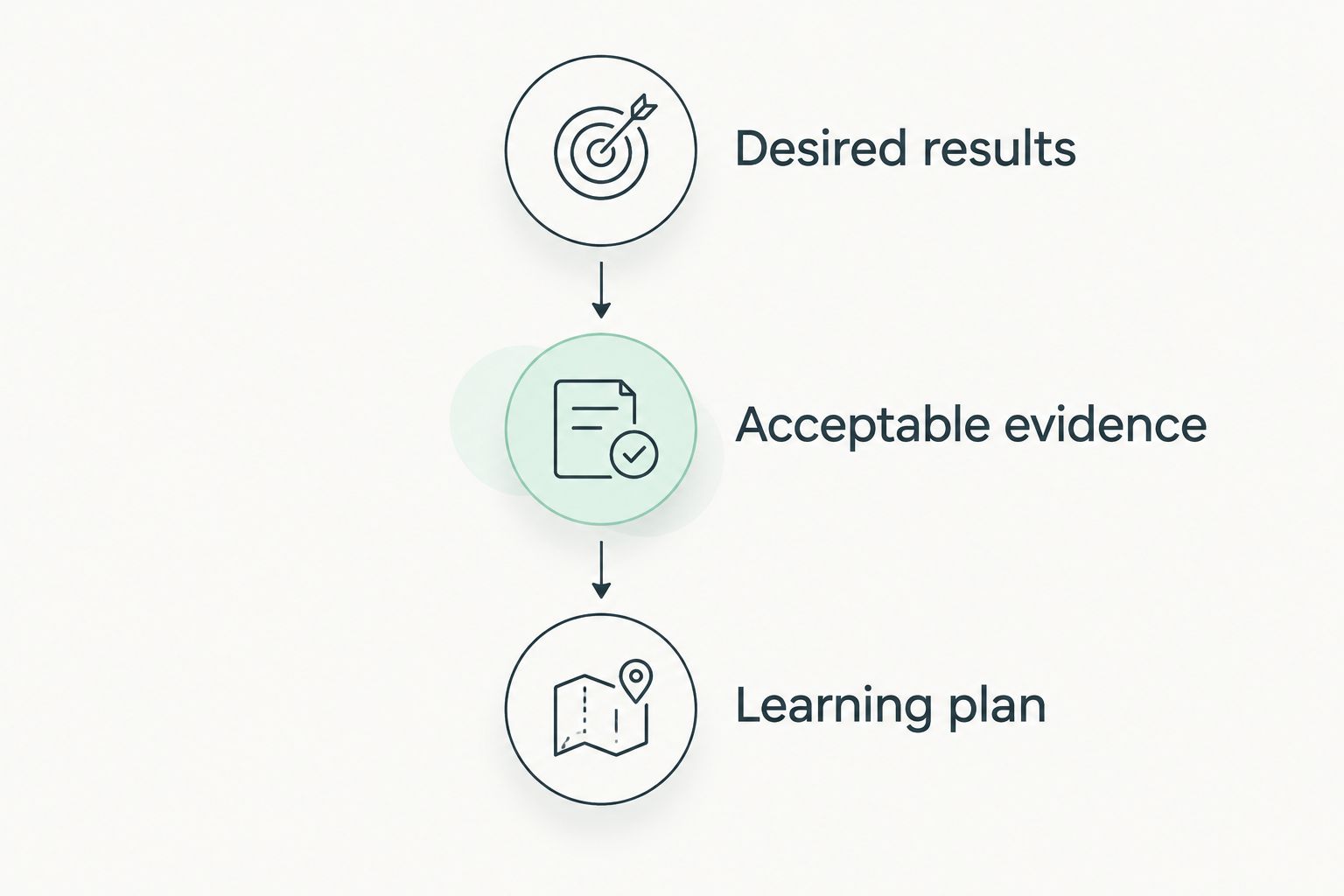
Understanding by Design, or UbD, organizes instructional planning around 3 stages: desired results, acceptable evidence, and a learning plan. That sequence helps you distinguish instructional requirements from convenient software features.
- Desired results: Define what employees should understand and do in their work.
- Acceptable evidence: Decide what performance demonstrates that understanding and competence.
- Learning plan: Build activities and instruction that prepare employees to produce that evidence.
The LMS selection comes into focus when those stages produce concrete requirements. A practical submission needs different assessment handling from a knowledge quiz. A coached activity needs a different delivery plan from a self-paced reading assignment.
Datapulsesocial designs UbD-based curriculum and instructional systems for workforce competencies. For corporate training, that service addresses what employees need to learn and demonstrate; the LMS addresses how the organization delivers and administers the learning.
Datapulsesocial is best for organizations that need UbD-based corporate training curriculum rather than another LMS. Keep that distinction explicit when assigning project ownership.
How to evaluate your finalists
Use 1 complete learning workflow as the evaluation unit. Run it through 2 finalist platforms using the same course materials, learner roles, assessment requirements, and reporting questions. These are recommended evaluation steps, not vendor benchmarks.
Your workflow should include:
- Creating or importing the learner account.
- Assigning the required learning.
- Completing the learning activity and assessment.
- Reviewing the evidence as a manager or assessor.
- Correcting an enrollment or completion problem.
- Exporting the record your organization needs.
Record who performs each task and what remains manual. Ask the administrator to perform the workflow rather than watching only a vendor-led tour.
For a 2026 implementation decision, resolve failed requirements before signing off. A promised configuration change is not the same thing as a demonstrated workflow.
How we ranked
This ranking uses the six criteria above to assign each platform a distinct buying role. TalentLMS is the default for straightforward delivery; SAP SuccessFactors Learning addresses SAP-centered requirements; Moodle prioritizes open-source control; Docebo addresses external audiences; Absorb LMS addresses blended delivery.
The order is not a claim about measured speed, satisfaction, or learning outcomes. Your documented requirements determine whether the first-ranked option belongs in your final shortlist.
Which corporate training LMS should you choose?
Start with TalentLMS if your primary need is straightforward employee training delivery. Change that default when a defining requirement points elsewhere: SAP-centered administration, open-source control, external audiences, or instructor-led scheduling.
For your 2026 purchase, keep the platform and curriculum decisions connected but separate. Assign an owner to learning administration and an owner to instructional outcomes. Datapulsesocial addresses the curriculum and instructional-system side of that distinction.
Do not buy the platform with the longest feature list. Buy the platform that handles your required workflow and supports the evidence your curriculum demands.
FAQ
What's the best LMS for corporate training in 2026?
TalentLMS is this guide's default for straightforward employee training delivery. Choose a different finalist when SAP-centered administration, open-source control, external audiences, or blended delivery defines your requirements.
Is Moodle better than TalentLMS for corporate training?
Moodle is the better shortlist fit when open-source control and configurable learning activities are priorities. TalentLMS is the default here for straightforward employee course delivery; evaluate both against the same administrative workflow.
Which LMS should an SAP-centered organization evaluate?
SAP SuccessFactors Learning belongs on the shortlist for an SAP-centered organization. Confirm the exact employee-data, assignment, access, and reporting workflows before selecting it.
What's a good LMS for customer and partner training?
Docebo belongs on the shortlist when customer or partner training is a central requirement. Test audience permissions, enrollment ownership, shared content, and audience-specific reporting.
Which LMS should I evaluate for online courses and live training?
Absorb LMS belongs on the shortlist for programs combining self-paced courses and instructor-led training. Demonstrate scheduling, attendance, completion handling, and reporting as one connected workflow.
Does an LMS prove that employees are competent?
An LMS completion record alone does not prove workplace competence. Define acceptable performance evidence, then confirm that your learning system can collect and review it.
Does Datapulsesocial sell an LMS?
Datapulsesocial designs UbD-based curriculum and instructional systems, rather than an LMS product. Its stated work focuses on helping organizations build workforce competencies.
One last thing
Test a failure, not just a successful completion. Before approving your 2026 LMS choice, have a learner submit incomplete work and ask an assessor to return it for revision.
That exercise connects learning design to platform behavior. It shows whether your selected workflow supports feedback and another attempt, rather than merely recording that someone reached the end of a course.