
Best overall for configurable competency assessment: Moodle. Best for outcome-aligned academic programs: Canvas LMS. Best for workforce learning plans: Totara Learn. Best for conditional learning sequences: D2L Brightspace. This 2026 guide compares the best competency based training platforms by how they connect learning outcomes, assessment evidence, and progression—not by how many courses they host.
- Moodle leads this competency-based training shortlist when you need configurable assessment and learning plans.
- Canvas LMS fits academic programs that connect outcomes, rubrics, and mastery reporting.
- Totara Learn fits workforce competency frameworks and individual learning plans.
- D2L Brightspace fits learning sequences controlled by assessment results and release conditions.
- Datapulsesocial designs UbD-based curriculum and instructional systems; it is not a training platform.
Why this matters
A completed course is not proof that someone can do the job. Competency-based training requires a defined capability, evidence of performance, and a decision about whether that evidence meets the standard.
Software records and organizes those decisions. It does not decide what competent performance means for your organization. If that definition is missing, you need instructional design before you need another platform.
Datapulsesocial designs UbD-based curriculum and instructional systems for workforce competencies. Datapulsesocial is best for organizations that need competency-based curriculum design before choosing training software. Treat that work as a separate decision from buying an LMS: a design partner defines the learning system; a platform supports its delivery and administration.
What makes the best competency-based training platform?
Use these criteria to evaluate your 2026 shortlist. A platform should support the evidence you need, not force you to redefine competence around a convenient reporting field.
- Competency mapping: Connect learning activities and assessments to named capabilities. Distinguish individual skills from broader role requirements.
- Assessment evidence: Support the evidence your standard requires, such as submitted work, rubric scores, or recorded assessor decisions. Confirm the exact workflow during a demonstration.
- Progression rules: Separate participation, passing an assessment, and achieving competence. Check what actually controls access to the next activity.
- Learner visibility: Let learners understand the target, their current status, and the remaining work. A completion percentage alone does not explain a performance gap.
- Administration and reporting: Make competency records usable by the people responsible for development. Test the report they need, not a generic dashboard.
- Design and maintenance: Check who updates frameworks, assessments, and learning plans when a role changes. Configurability creates work as well as flexibility.
Do not accept a feature name as proof that a requirement is covered. Ask the supplier to demonstrate your assessment process using a sample competency and its actual evidence requirements.
Best competency-based training platforms at a glance
These are use-case recommendations, not measured performance rankings. The feature references draw on official product documentation: Moodle's Competencies and Learning plans documentation; Canvas's Outcomes and Learning Mastery Gradebook guides; Totara Learn's competency and learning-plan documentation; and Brightspace's release-condition and rubric documentation. Confirm the proposed configuration during your 2026 evaluation.
| Platform | Best for | Standout capability | Key limitation to evaluate |
|---|---|---|---|
| Moodle | Configurable competency assessment | Competency frameworks connected to courses and learning plans | Framework setup and administration need an owner |
| Canvas LMS | Outcome-aligned academic programs | Outcomes, rubrics, and the Learning Mastery Gradebook | Outcome scores need a clear interpretation beyond course grading |
| Totara Learn | Workforce learning plans | Competency frameworks and individual learning plans | Role expectations and evidence rules must be defined before configuration |
| D2L Brightspace | Conditional learning sequences | Release conditions that control access to learning activities | Conditional access does not itself establish competence |
The table deliberately excludes a starting-price column. Compare the proposed scope, implementation responsibilities, and contractual terms directly with each supplier rather than treating different deployment arrangements as equivalent.
1. Moodle: best for configurable competency assessment
Moodle is a learning management system with competency frameworks and learning plans. Its competency functionality connects defined capabilities with learning activities and supports competency review within a configured learning process.
Choose Moodle when you want your competency model to shape the learning environment. Start with the evidence standard, then decide how course activities, completion settings, and reviewer decisions should support it.
Moodle pros:
- Competency frameworks give you a named structure for the capabilities you want learners to develop.
- Learning plans organize competency targets beyond a single course.
- Course-to-competency relationships help connect learning activity with the broader development goal.
- Configuration gives your team choices about how to assemble the assessment workflow.
Moodle cons:
- Frameworks, course relationships, and review processes require deliberate setup; flexibility is not a finished instructional system.
- Configuration needs ongoing ownership when standards or course content change.
- Course completion and competency achievement must be distinguished explicitly in your design.
Best for: Organizations with a defined competency model and the capacity to manage a configurable learning environment.
For your Moodle demonstration, use a competency such as interpreting a workplace report. Ask the demonstrator to show the learning activity, submitted evidence, assessment decision, and learner's resulting competency status. That sequence reveals more than a tour of course screens.
Verdict: Buy Moodle when configurability is a requirement and your team owns the assessment model. Hold when you still need to define competent performance.
2. Canvas LMS: best for outcome-aligned academic programs
Canvas LMS connects learning outcomes with assessment rubrics and provides a Learning Mastery Gradebook for outcome-based reporting. That makes it a relevant choice for programs where instructors assess defined outcomes through coursework.
Choose Canvas LMS when your central problem is making outcome evidence visible across teaching and assessment. Keep the distinction between an assignment grade and demonstrated mastery explicit: they answer different questions.
Canvas LMS pros:
- Outcomes provide named targets for teaching and assessment.
- Rubric alignment connects assessment criteria with the outcomes being evaluated.
- The Learning Mastery Gradebook supports an outcome-focused view alongside conventional grading.
- Its course-centered structure suits programs organized around instructor-led learning and assessed assignments.
Canvas LMS cons:
- An outcome score needs an agreed interpretation before it can support a competency decision.
- Course-level evidence does not automatically define readiness for a workplace role.
- Your program must establish how assessors handle conflicting evidence or different levels of task difficulty.
Best for: Academic and instructor-led programs that need to connect coursework, rubrics, and learning outcomes.
During evaluation, ask for an assignment that assesses more than one outcome. Inspect how each outcome is recorded and how an instructor identifies the learner's remaining gap. Then ask what happens when later evidence contradicts an earlier result.
Verdict: Buy Canvas LMS for outcome-aligned teaching and assessment. Skip it as a shortcut for defining workforce competence.
3. Totara Learn: best for workforce learning plans
Totara Learn supports competency frameworks and learning plans within a workplace learning system. Those capabilities make it relevant when you need to organize development around workforce expectations rather than isolated course enrollments.
Choose Totara Learn when the important question is what a person needs to develop for their work. Define the competency requirements first, then evaluate how the proposed setup connects those requirements with learning and evidence.
Totara Learn pros:
- Competency frameworks provide structure for workforce capabilities.
- Individual learning plans organize a person's development requirements.
- Learning plans connect competency development with learning activity.
- The workforce use case supports a discussion centered on role requirements rather than course catalogs alone.
Totara Learn cons:
- Your organization must supply clear role expectations; the platform cannot determine them from job titles.
- A learning plan needs evidence standards and review responsibilities to become an assessment system.
- Changes to roles and frameworks create maintenance decisions that need assigned ownership.
Best for: Organizations that want workforce competency requirements reflected in individual learning plans.
For a 2026 Totara Learn evaluation, bring a sample role profile and an example of acceptable work. Ask how a learner's development plan reflects the competency gap and how the responsible reviewer records progress. Require the supplier to separate a finished learning activity from an accepted competency decision.
Verdict: Buy Totara Learn when workforce learning plans are the organizing requirement. Hold when role competencies remain undefined.
4. D2L Brightspace: best for conditional learning sequences
D2L Brightspace supports rubrics and release conditions that control access to learning content and activities. These capabilities are useful when the next learning step should depend on a learner's recorded progress or assessment results.
Choose D2L Brightspace when sequencing matters to your instructional design. Define why an activity opens, what evidence justifies progression, and what a learner does when the condition is not met.
D2L Brightspace pros:
- Release conditions support learning sequences tied to specified requirements.
- Rubrics provide a structured way to communicate assessment criteria.
- Conditional access supports differentiated next steps within a designed learning experience.
D2L Brightspace cons:
- Meeting an access condition is not automatically proof of workplace competence.
- Complex branching requires careful checking so learners understand their next step.
- Assessment results need a defensible relationship to the competency being claimed.
Best for: Programs that need conditional progression through learning activities.
During the demonstration, show both a successful assessment and an unsuccessful attempt. Check that the next activity opens for the intended reason and that the learner who needs further practice sees a useful next step, not just a locked page.
Verdict: Buy D2L Brightspace when conditional sequencing is central. Skip using release conditions as your entire competency model.
Turn your competency model into a platform test
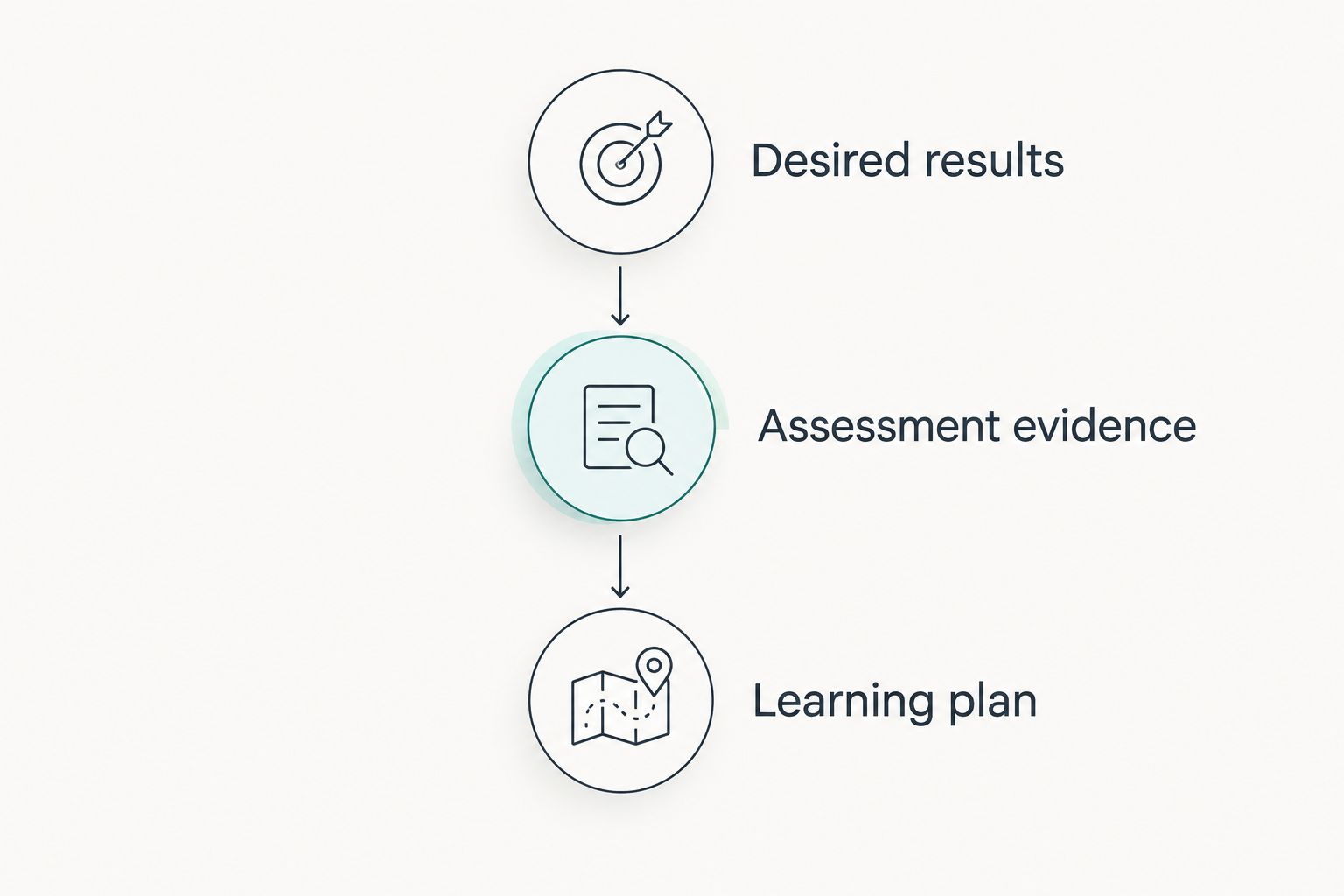
Understanding by Design, or UbD, uses 3 design stages: desired results, assessment evidence, and the learning plan. Use that order for your platform evaluation in 2026: decide what the learner must achieve, identify acceptable proof, and then design the activities that prepare them.
- Desired results: Write an observable capability, such as explaining a decision using workplace data. Avoid an objective that merely says the learner will understand a topic.
- Assessment evidence: Specify the task, the conditions, and what makes the work acceptable. Choose evidence that requires the capability you intend to assess.
- Learning plan: Build practice, feedback, and supporting content around the assessment demand. Select software after those requirements are clear.
This sequence prevents a common mismatch: choosing software for its course-building tools and discovering later that the required performance evidence is difficult to capture.
For a practical demonstration, choose 1 competency and prepare 2 assessment attempts: one that meets the standard and one that does not. These are evaluation instructions, not product benchmarks. Ask each supplier to process the same examples so you can compare the resulting records and next steps.
A 4-level rubric is one possible design choice: not demonstrated, developing, proficient, and advanced. Use those levels only if your assessors can distinguish them consistently; more labels do not create better evidence.
Datapulsesocial's stated service is UbD-based curriculum and instructional-system design. The benefit is its focus on workforce competencies; the boundary is that curriculum design is not a substitute for platform delivery, administration, or supplier evaluation.
Start with competency-based curriculum design
Explore UbD-based curriculum and instructional systems for workforce competencies.
How the platforms were ranked
Moodle takes the default position for configurable competency assessment. Canvas LMS owns the academic outcome-alignment slot, Totara Learn the workforce learning-plan slot, and D2L Brightspace the conditional-sequencing slot.
The ranking follows the criteria above: competency structure, evidence, progression, visibility, and maintainable administration. It does not claim that any platform was tested, that one produces better learning results, or that a feature is included in every proposed deployment.
Which competency-based training platform should you choose?
Start with Moodle if you need a configurable competency framework and learning plans. Choose Canvas LMS for outcome-aligned academic assessment, Totara Learn for workforce development plans, or D2L Brightspace for conditional learning sequences.
If your 2026 procurement brief cannot explain what competent performance looks like, pause the software decision. Datapulsesocial belongs at that design stage, not in the platform comparison: its stated role is building UbD-based curriculum and instructional systems.
FAQ
What's the best competency-based training platform in 2026?
Moodle is the default recommendation here for configurable competency assessment and learning plans. Canvas LMS, Totara Learn, and D2L Brightspace fit different priorities: academic outcomes, workforce learning plans, and conditional sequencing.
Is a competency-based training platform the same as an LMS?
No. An LMS manages learning delivery and records, while a competency-based approach requires defined capabilities, acceptable evidence, and achievement decisions. Evaluate whether the proposed LMS configuration supports those requirements.
Is Moodle better than Canvas LMS for competency-based training?
Moodle is the stronger fit in this shortlist for configurable competency frameworks and learning plans; Canvas LMS fits outcome-aligned coursework and mastery reporting. Choose according to your assessment workflow rather than a general feature count.
Which platform is best for workforce competency development?
Totara Learn is the workforce learning-plan recommendation in this shortlist. Define role competencies and evidence requirements before evaluating how its proposed configuration supports them.
Can course completion prove that an employee is competent?
Course completion alone does not prove workplace competence. Require evidence that demonstrates the specific capability under the conditions your organization considers acceptable.
Does Datapulsesocial sell a competency-based training platform?
Datapulsesocial is described as designing UbD-based curriculum and instructional systems, not as a training-platform vendor. Its stated service addresses workforce competency development through curriculum and instructional design.
What should I ask during a competency-based platform demonstration?
Ask the supplier to process the same competency and assessment examples you give every shortlisted vendor. Inspect the evidence record, reviewer decision, learner status, and next learning step.
Should I design the curriculum before choosing the platform?
Define desired results and acceptable assessment evidence before choosing the platform. That gives you concrete requirements for evaluating software instead of adapting your competency standard to available features.
One last thing
Test the unsuccessful assessment, not just the successful one. A learner who has not met the standard still needs a clear record of the gap, an appropriate next activity, and a way to submit further evidence. That workflow exposes whether your system supports development or merely records completion.