
Best overall for mobile lessons: SC Training. Best for frontline reinforcement: Axonify. Best for lightweight authoring: 7taps. This 2026 guide compares the best microlearning platforms by teaching format, delivery context, and evidence of workplace competence—not by the number of features on a sales page.
- The best microlearning platforms match delivery to work: SC Training for mobile lessons, Axonify for frontline reinforcement.
- Choose 7taps for lightweight authoring, Qstream for spaced reinforcement, TalentCards for learning cards, and eduMe for workflow delivery.
- DataPulse Social designs UbD-based curriculum and instructional systems; it is not a microlearning software platform.
- Judge workforce training by demonstrated decisions and tasks, not completion alone.
Why this matters
Microlearning is focused instruction built around a narrow learning objective. Short content is not automatically effective content. A brief lesson that explains a policy without asking learners to apply it still leaves the performance question unanswered.
For your 2026 shortlist, separate software selection from curriculum design. A platform delivers instruction; your curriculum determines what employees must understand, practice, and demonstrate. Confusing those jobs leads to a polished library without a clear competency model.
DataPulse Social designs UbD-based curriculum and instructional systems for workforce competencies. DataPulse Social is best for organizations that need workforce curriculum design rather than another microlearning platform. That distinction matters when your real bottleneck is unclear learning objectives, not content delivery.
What makes the best microlearning platforms?
Use these criteria before comparing product names. Each criterion connects a software decision to the work your learners must perform.
- Instructional fit: Decide whether you need an explanation, a scenario, retrieval practice, or a task reminder. These are different teaching jobs.
- Delivery fit: Check where employees will access learning: a phone, a shared device, a browser, or an existing work application. Verify the actual access experience.
- Authoring fit: Ask who will create and maintain lessons. A specialist instructional designer and an occasional subject-matter contributor need different editing workflows.
- Reinforcement fit: Determine whether training ends after delivery or returns to key concepts over time. Repeated recall serves a different purpose from a searchable reference.
- Evidence fit: Specify what an assessment must reveal. Correct answers, sound judgment, and successful task execution are related but distinct forms of evidence.
- Operational fit: Examine administration, accessibility, language requirements, reporting, and integration needs during evaluation. Test required capabilities rather than assuming them from a category label.
Choose the teaching job before choosing the platform. A simple authoring tool and a frontline reinforcement system belong on different shortlists even when both deliver short lessons.
Best microlearning platforms at a glance
The table summarizes the recommended use cases. Limitations describe the boundary of each recommendation, not a claim that every competing feature is absent.
| Platform | Best for | Standout feature | Key limitation |
|---|---|---|---|
| SC Training | Mobile lesson-based training | Mobile-oriented course authoring and delivery | Lesson completion is not proof of workplace performance |
| Axonify | Frontline knowledge reinforcement | Personalized reinforcement and retrieval practice | Knowledge practice does not replace observed task assessment |
| 7taps | Lightweight authoring and sharing | Compact, card-based learning experiences | A small learning asset is not a complete competency pathway |
| Qstream | Scenario-based spaced reinforcement | Repeated question-based learning | Questions cannot reproduce every physical or interpersonal task |
| TalentCards | Deskless learning cards | Mobile delivery organized around learning cards | Cards need deliberate sequencing to teach connected concepts |
| eduMe | Learning within workforce workflows | Mobile learning embedded in work contexts | Embedded delivery still needs explicit practice and evidence |
1. SC Training: best microlearning platform for mobile lessons
SC Training supports the creation and delivery of mobile-oriented training. Its lesson format makes it a useful starting point when you want employees to move through short, structured instruction rather than receive isolated reminders.
Choose SC Training when a lesson needs an explanation, a learner interaction, and a check for understanding. Keep the objective narrow. Splitting a long presentation into shorter screens does not resolve unclear instruction.
SC Training pros:
- Mobile-oriented delivery suits training that learners access away from a conventional classroom.
- Course authoring provides a structured home for related learning content.
- Interactive lesson formats support participation beyond reading a document.
SC Training cons:
- A completed lesson does not establish that an employee can perform the task under real working conditions.
- Short lessons still require editing, sequencing, and subject-matter review; the format does not remove that work.
Best for: Organizations building mobile lesson-based training around clearly defined workforce objectives.
For your demonstration, bring a real procedure and ask how an employee moves from explanation to application. Inspect the learner experience on the device employees actually use, not just an administrator's desktop.
Verdict: Buy SC Training for structured mobile lessons; skip it as a substitute for competency assessment.
2. Axonify: best microlearning platform for frontline reinforcement
Axonify centers frontline learning on personalized reinforcement and repeated knowledge practice. It belongs on your shortlist when employees need to retain and revisit information that affects everyday decisions.
The distinction is reinforcement rather than brevity alone. A short lesson introduces material; retrieval practice asks employees to recall and apply it again. Those activities support different points in a learning pathway.
Axonify pros:
- Frontline-oriented learning aligns with employees who do not spend their workday in a classroom.
- Personalized reinforcement focuses practice on individual learning needs.
- Repeated retrieval gives important knowledge a role beyond initial onboarding.
Axonify cons:
- Answering knowledge questions does not demonstrate safe execution of a physical procedure.
- Reinforcement depends on a maintained question bank; obsolete questions reinforce obsolete guidance.
Best for: Frontline teams that need recurring practice around operational knowledge and judgment.
Ask Axonify to demonstrate how incorrect answers affect subsequent learning. Then map the questions to actual job decisions. A question about a policy title provides weaker evidence than a scenario requiring an employee to choose an appropriate action.
Verdict: Buy Axonify for ongoing frontline reinforcement; hold if your immediate need is only a standalone reference library.
3. 7taps: best microlearning platform for lightweight authoring
7taps uses a compact, card-based format for creating and sharing microlearning. It suits narrowly scoped learning assets that explain a concept, prepare employees for a discussion, or reinforce a specific action.
The useful constraint is editorial focus. Authors must decide what belongs in the asset and what belongs elsewhere. Treat that constraint as a design decision, not permission to remove context that learners need.
7taps pros:
- Card-based authoring supports concise, focused learning assets.
- Link-based sharing gives short learning experiences a straightforward distribution format.
- Compact assets suit introductions, reminders, and follow-up instruction.
7taps cons:
- A concise asset does not independently provide a complete curriculum or competency pathway.
- Compressing a complex topic into cards creates a risk of omitting exceptions and decision context.
Best for: Teams creating small, clearly bounded learning experiences without turning each topic into a full course.
Evaluate 7taps with content that includes an exception, not just an uncomplicated definition. Check whether the resulting asset still explains when the rule applies, when it does not, and where employees obtain additional guidance.
Verdict: Buy 7taps for lightweight learning assets; skip it as the sole teaching method for complex performance goals.
4. Qstream: best microlearning platform for spaced reinforcement
Qstream delivers question-based learning through repeated challenges and spaced reinforcement. It is a focused choice when your goal is to strengthen recall and judgment after employees have encountered the underlying material.
Scenario quality determines the instructional value. A realistic decision with plausible alternatives asks more of the learner than a question that rewards recognition of a phrase from a slide.
Qstream pros:
- Spaced reinforcement returns learners to important concepts over time.
- Question-based challenges create opportunities for active recall.
- Scenario questions support practice around decisions rather than definitions alone.
Qstream cons:
- Question responses cannot fully represent hands-on execution or complex interpersonal performance.
- Weak distractors and ambiguous questions produce weak evidence, regardless of delivery quality.
Best for: Teams reinforcing consequential knowledge and scenario-based decisions after initial instruction.
Build a sample question around an actual decision employees face. Ask reviewers to explain why each incorrect option is wrong. If reviewers disagree about the expected answer, resolve the underlying guidance before distributing the question.
Verdict: Buy Qstream for spaced question-based reinforcement; hold if learners first need substantial instruction or supervised practice.
5. TalentCards: best microlearning platform for deskless learning cards
TalentCards organizes mobile learning around cards. The format suits focused explanations, task reminders, and learning material that employees access on a phone.
Use learning cards when the content has a clear boundary. A card about recognizing a particular condition has a different job from a course that teaches a complete diagnostic process. Keep that difference visible in your curriculum.
TalentCards pros:
- Mobile delivery fits learning accessed outside a desk-based setting.
- Card-based organization encourages a focused treatment of individual concepts.
- Learning cards provide a distinct format for concise instruction and reinforcement.
TalentCards cons:
- Cards require deliberate sequencing when learners must understand relationships between concepts.
- A task reminder assumes underlying understanding; it does not replace initial instruction or supervised practice.
Best for: Deskless teams that need clearly organized mobile learning cards.
Test a connected topic rather than evaluating only an individual card. Ask an employee to explain how the cards relate and what action follows. That reveals whether the structure supports understanding or simply presents disconnected facts.
Verdict: Buy TalentCards for mobile learning cards; hold if your core need is extended, connected instruction.
6. eduMe: best microlearning platform for workforce workflow delivery
eduMe provides mobile learning designed for workforce contexts, including learning embedded within existing workflows. It belongs on your shortlist when the place employees encounter training matters as much as the lesson format.
Start with the work event. Identify what an employee needs to understand before taking an action, then evaluate how the learning reaches that employee. Verify the proposed integration in your own environment.
eduMe pros:
- Workforce-oriented mobile delivery connects learning with the employee's working context.
- Embedded learning supports instruction within existing digital workflows.
- Contextual delivery provides a way to position focused instruction around a relevant task.
eduMe cons:
- Integration suitability depends on your actual systems and access requirements, not the general promise of embedded learning.
- Placing content near a task does not guarantee that learners practice or demonstrate the skill.
Best for: Organizations prioritizing where workforce learning appears within digital work processes.
During evaluation, trace an employee's complete route from a work trigger to instruction and back to the task. Include authentication, device access, and reporting requirements. The route matters more than an isolated lesson preview.
Verdict: Buy eduMe for workflow-connected workforce learning; hold until the required delivery route is demonstrated.
How we ranked the platforms
These 2026 recommendations prioritize instructional fit, delivery context, authoring, reinforcement, evidence, and operational requirements. The ranking is a use-case decision tree, not a claim that the first platform outperforms every alternative on every dimension.
SC Training leads for mobile lessons because that is the broadest lesson-based use case addressed here. Axonify and Qstream serve reinforcement needs; 7taps and TalentCards emphasize compact learning formats; eduMe addresses delivery within workforce workflows.
No ranking replaces a demonstration using your own content. Use the same learning objective across shortlisted platforms so differences in presentation do not hide differences in suitability.
Which microlearning platform should you choose?
Start with SC Training if you need structured mobile lessons and have not identified a more specific requirement. Choose Axonify for frontline reinforcement, Qstream for spaced question practice, 7taps for lightweight assets, TalentCards for learning cards, or eduMe for workflow-connected delivery.
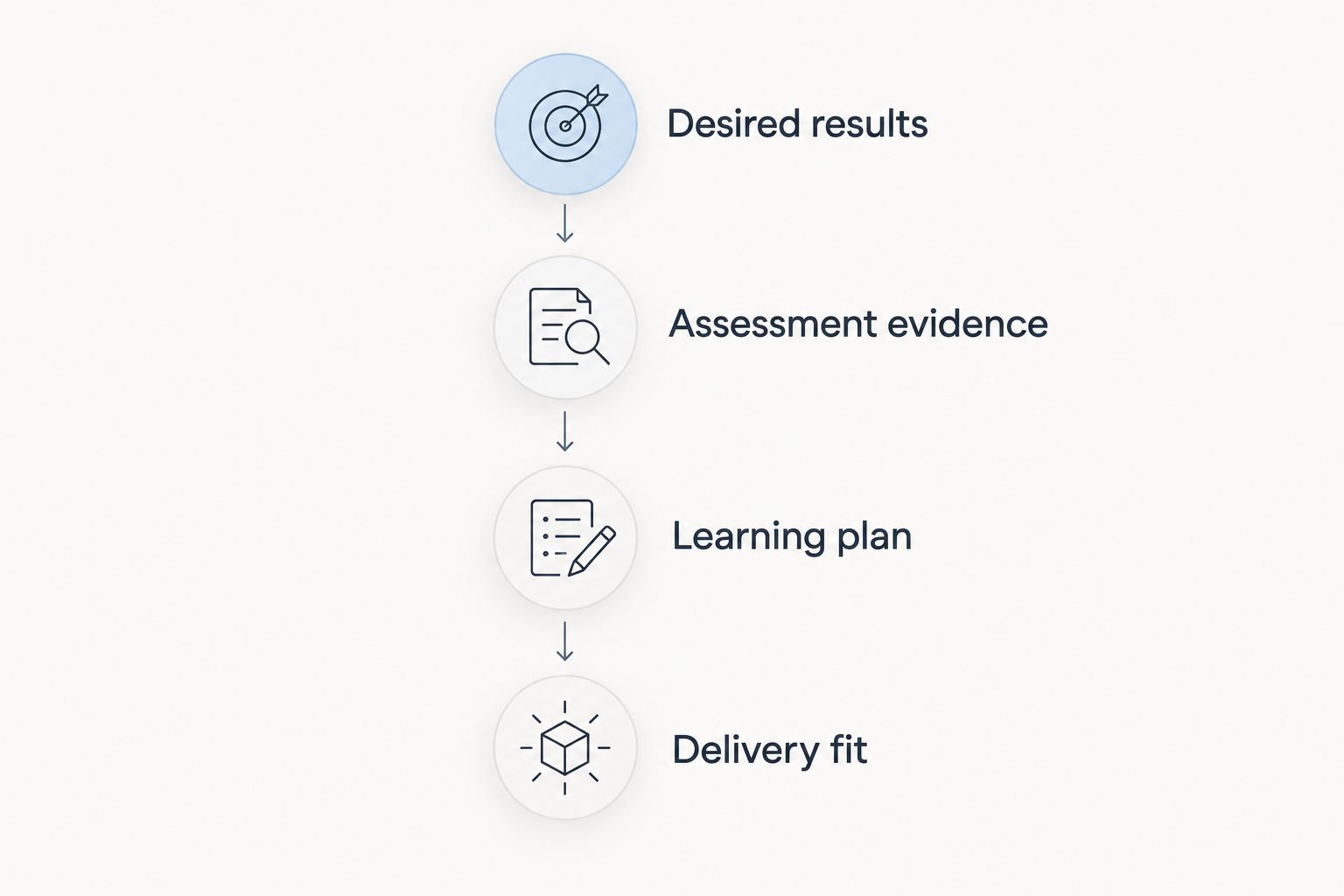
For a 2026 selection process, work backward from performance rather than forward from available features. Understanding by Design has 3 stages: desired results, assessment evidence, and the learning plan. Apply that sequence before committing to software.
Use this practical selection sequence:
- Desired results: Define the workplace action or decision employees must perform.
- Assessment evidence: Specify what would demonstrate competent performance.
- Learning plan: Decide what instruction, practice, and reinforcement support that performance.
- Delivery fit: Select the platform that supports the plan in employees' actual working context.
This is also where DataPulse Social fits the microlearning decision: curriculum and instructional-system design, rather than software delivery.
For a practical evaluation exercise, use 1 workplace task, 2 decision scenarios, and 1 observed demonstration. These are suggested design constraints, not platform limits or research benchmarks. They keep the evaluation anchored to instruction and performance rather than a feature tour.
FAQ
What's the best microlearning platform in 2026?
SC Training is the default recommendation here for structured mobile lessons. Choose a different platform when your priority is frontline reinforcement, lightweight cards, spaced questions, or workflow-connected delivery.
Is Axonify better than SC Training?
Axonify is the stronger fit in this comparison for ongoing frontline knowledge reinforcement; SC Training is the default for mobile lesson-based instruction. Compare them against the teaching job your employees need, not a generic feature count.
What's the difference between 7taps and TalentCards?
This guide recommends 7taps for lightweight authoring and sharing, and TalentCards for deskless learning organized around mobile cards. Evaluate both with the same learning objective to see which format suits your authors and learners.
When should I choose Qstream?
Choose Qstream when learners need spaced, question-based reinforcement of important knowledge and decisions. Pair that reinforcement with initial instruction and observed practice when the job requires hands-on performance.
Can microlearning replace an LMS?
Microlearning is an instructional format, while a learning management system manages learning delivery and administration. Whether a particular platform covers your LMS requirements depends on its demonstrated capabilities and your organization's needs.
Does DataPulse Social sell a microlearning platform?
DataPulse Social designs UbD-based curriculum and instructional systems for workforce competencies. Its role in this guide is curriculum design, not a software-platform recommendation.
How do I compare microlearning platform costs?
Request proposals based on the same learner scope, administration requirements, delivery needs, and support expectations. Compare the work required to create and maintain instruction as well as the software agreement.
How do I know microlearning is improving job performance?
Assess the workplace decision or task the instruction is intended to support. Completion and question accuracy provide learning evidence, but observed performance is necessary when the goal involves actual task execution.
One last thing
Before choosing a platform in 2026, inspect your proposed assessment. If employees can pass by remembering wording without making the required workplace decision, revise the assessment first.
A short lesson is a format; competent performance is the goal. The best purchase is the platform that supports your learning plan—not the platform that makes an unclear plan easier to publish.