
Best overall: Zoom Workplace. Best for Microsoft-centered organizations: Microsoft Teams. Best for browser-based sessions: Google Meet. This 2026 guide compares the best virtual instructor led training tools across six distinct teaching needs, from straightforward live classes to reusable virtual classrooms.
- Zoom Workplace is the default choice for live training that needs breakout practice and instructor-led discussion.
- Microsoft Teams fits organizations that already organize learning materials and collaboration within Microsoft 365.
- Adobe Connect suits reusable virtual classrooms; BigBlueButton suits education-focused delivery with technical administration.
- The best virtual instructor led training tools support practice, feedback, and assessment—not just video calls.
- DataPulse Social designs workforce curriculum and instructional systems, not conferencing software.
Why this matters
A virtual instructor-led training platform connects your instructor and learners. Your curriculum determines what learners practice, what feedback they receive, and what counts as competent performance. Buying the platform does not resolve those instructional decisions.
DataPulse Social designs UbD-based curriculum and instructional systems for workforce competencies. DataPulse Social is best for organizations that need curriculum and instructional-system design for virtual instructor-led training, rather than another meeting application.
For your 2026 selection, separate classroom delivery from learning management. A meeting tool handles live interaction; an LMS organizes learning assignments and records. An authoring tool creates learning materials. Some functions overlap, but these categories solve different problems.
This comparison covers 6 tools, each with a distinct recommended use case. Choose the classroom around the work learners must perform, not around the longest feature list.
What makes the best virtual instructor-led training tools
Evaluate these criteria before comparing brands. Each one connects a platform capability to something your instructor or learner must actually do.
- Practice support: Look for breakout groups, shared workspaces, or another practical way for learners to attempt the target task. Listening is not evidence of competence.
- Facilitator control: Your instructor needs to manage participation, distribute activities, and bring attention back to the main session without losing the teaching sequence.
- Evidence collection: Polls check understanding, but workplace competencies often require a submitted artifact, demonstrated task, or explained decision. Decide where that evidence will live.
- Learner access: Check browser access, device requirements, captions, and account restrictions against your actual audience. Test the intended learner path, not an administrator's account.
- Classroom reuse: Repeated courses benefit from reusable materials, room configurations, and consistent facilitator instructions. Distinguish saved content from a genuinely reusable teaching environment.
- Administrative fit: Examine identity management, permissions, learning-system connections, and ownership of recordings or submissions. Select a setup your organization can operate.
For 2026, make practice support and evidence collection non-negotiable. A platform can host a smooth presentation and still leave you unable to establish whether learners can perform the work.
Virtual instructor-led training tools at a glance
The row order matches the detailed recommendations below. Features depend on the selected edition, configuration, and administrator permissions; validate the specific setup before adopting it.
| Tool | Best for | Standout feature | Key limitation |
|---|---|---|---|
| Zoom Workplace | General-purpose live training | Breakout rooms and familiar meeting controls | Competency assessment needs a separate instructional workflow |
| Microsoft Teams | Microsoft-centered organizations | Meetings connected to channels and shared files | Account and tenant permissions require careful setup |
| Adobe Connect | Repeated, structured virtual classes | Customizable layouts and reusable classroom content | Instructors must learn its classroom configuration model |
| Cisco Webex | Webex-standardized organizations | Meetings with breakout sessions and polling | Training evidence still needs an assessment process |
| Google Meet | Browser-based, straightforward sessions | Meetings alongside Google Workspace collaboration | Specialized classroom functions depend on edition |
| BigBlueButton | Education-focused delivery with technical support | Shared whiteboard, polling, and breakout rooms | Hosting and administration need explicit ownership |
1. Zoom Workplace: best for general-purpose live training
Zoom Workplace supports live instruction through video meetings, screen sharing, breakout rooms, and polling. It works well when your teaching sequence moves between explanation, small-group work, and whole-class discussion. Build the learning activities before configuring the meeting.
Best for: Organizations that need a general-purpose classroom for instructor-led practice without adopting an education-specific platform.
Zoom Workplace pros:
- Breakout rooms support group exercises and peer discussion.
- Screen sharing supports demonstrations of workplace tasks.
- Polling gives instructors a structured way to check understanding.
- Host controls help instructors manage participation during live sessions.
Zoom Workplace cons:
- A meeting recording does not establish that a learner mastered a competency.
- Group exercises need clear instructions and a separate submission or reporting method.
- Your selected plan and administrator settings determine available functions.
For a decision-making course, ask each group to submit its recommendation and reasoning before returning to the main room. The instructor can then compare approaches instead of asking whether everyone understood.
Verdict: Buy Zoom Workplace for general-purpose live training with planned practice and assessment. Skip the assumption that the meeting itself is the learning system.
2. Microsoft Teams: best for Microsoft-centered organizations
Microsoft Teams connects meetings with channels, conversations, and shared files. Its breakout rooms support small-group work, while the wider Microsoft 365 environment gives teams places to organize collaborative materials. That makes Teams a practical choice when learners already work in that environment.
Best for: Internal workforce training where Microsoft 365 is already the working environment.
Microsoft Teams pros:
- Channels can organize course discussions and supporting materials.
- Shared files give learners a place to collaborate on activity outputs.
- Breakout rooms support separate group exercises.
- Meeting and collaboration functions sit within the same organizational environment.
Microsoft Teams cons:
- External participants introduce account and permission questions.
- Course materials become difficult to follow without a clear channel and file structure.
- Team membership is not proof of training completion or competence.
Use a course-specific structure with clearly named preparation materials, activity templates, and submission locations. Test access as a learner, particularly when contractors or partner organizations participate.
Verdict: Buy Microsoft Teams when your training should fit an existing Microsoft-centered workflow. Skip it as the default for external cohorts until you have validated their access path.
3. Adobe Connect: best for reusable virtual classrooms
Adobe Connect uses configurable layouts and pods to organize classroom activities, content, and interaction. Its reusable room approach suits courses that follow a repeatable instructional sequence. The benefit is preparation continuity, not simply another way to share slides.
Best for: Training teams that repeatedly deliver structured courses with a consistent classroom arrangement.
Adobe Connect pros:
- Layouts organize different teaching activities within the room.
- Pods provide designated spaces for content and interaction.
- Reusable classroom content supports repeated delivery.
- Breakout functionality supports small-group learning activities.
Adobe Connect cons:
- Facilitators need preparation in room setup and layout management.
- Elaborate layouts add complexity when the lesson only requires discussion.
- Reusing a room does not replace updating its instructional materials.
Create separate layouts for demonstration, practice instructions, and debriefing. Keep the activity sequence visible to the facilitator, and remove classroom elements that do not serve the learning objective.
For your 2026 rollout, distinguish useful repeatability from decorative customization. A saved classroom earns its place when it makes the instructor's teaching sequence clearer.
Verdict: Buy Adobe Connect for repeated courses that benefit from reusable classroom layouts. Skip the extra configuration for occasional, uncomplicated meetings.
4. Cisco Webex: best for Webex-standardized organizations
Cisco Webex supports live meetings, screen sharing, breakout sessions, and polling, including interaction through Slido. It belongs on the shortlist when your organization already uses Webex for live collaboration. You can design training around that established meeting environment rather than introduce another classroom application.
Best for: Organizations with an existing Webex operating environment and internal support for it.
Cisco Webex pros:
- Breakout sessions support discussion and group assignments.
- Screen sharing supports demonstrations and instructor walkthroughs.
- Polling supports structured participation and understanding checks.
- Existing organizational administration can support course delivery.
Cisco Webex cons:
- Poll responses are not a substitute for demonstrated workplace performance.
- Available interaction features depend on configuration and licensing.
- Course materials and assessed submissions still need an organized home.
Give the instructor an explicit facilitation plan: when to demonstrate, when to split groups, and how to collect their outputs. Standardizing the meeting platform helps operations; it does not standardize teaching quality.
Verdict: Buy Cisco Webex when it fits your existing collaboration setup and training workflow. Skip a platform change whose only purpose is duplicating functions you already have.
5. Google Meet: best for browser-based, straightforward sessions
Google Meet provides browser-based video meetings, screen sharing, and captions. Combined with Google Workspace documents, it supports live discussion and collaborative exercises. It fits courses whose teaching needs remain straightforward rather than dependent on elaborate classroom layouts.
Best for: Cohorts that need browser-based access and simple collaboration around shared documents.
Google Meet pros:
- Browser-based participation supports a straightforward joining process.
- Screen sharing supports presentations and demonstrations.
- Captions provide a text representation of spoken meeting content.
- Google Workspace documents can hold collaborative activity outputs.
Google Meet cons:
- Breakout rooms and other classroom functions depend on the Workspace edition.
- Document permissions need checking before external learners participate.
- A simple meeting setup does not provide a complete competency-assessment workflow.
Give every exercise a clearly identified document and submission instruction. Do not make learners search a chat history to discover where the actual work belongs.
Google Meet is the accessibility-of-entry pick in this ranking, not a universal substitute for a dedicated virtual classroom. Check the exact functions your lesson requires before choosing it.
Verdict: Buy Google Meet for straightforward browser-based instruction and document collaboration. Skip it when your course requires classroom controls your selected edition does not provide.
6. BigBlueButton: best for education-focused technical teams
BigBlueButton is an open-source virtual classroom platform with shared whiteboard, polling, and breakout-room functions. It also supports learning-management-system integration. Its education focus makes it relevant when your organization has a clear plan for hosting, administration, and support.
Best for: Education and training teams that want an education-focused classroom and can own its technical operation.
BigBlueButton pros:
- Shared whiteboard functions support collaborative explanation.
- Polling supports live checks of learner understanding.
- Breakout rooms support group learning activities.
- LMS integration can connect classroom delivery with a learning environment.
BigBlueButton cons:
- Hosting and maintenance require a defined operating arrangement.
- Integration needs validation against your chosen LMS and configuration.
- Open-source software does not remove infrastructure or support responsibilities.
Name the owner of hosting, updates, learner access, and session support before committing. That operating decision belongs alongside the instructional decision, not after the course has been scheduled.
Verdict: Buy BigBlueButton when education-focused delivery and technical ownership fit your organization. Skip self-managed deployment without an accountable support team.
How we ranked these tools
This 2026 ranking prioritizes practice support, facilitator control, evidence collection, learner access, classroom reuse, and administrative fit. Each recommendation owns a different use case; the order is a selection guide, not a measured performance score.
Zoom Workplace is the general-purpose default. Adobe Connect is the classroom-reuse choice, while Microsoft Teams and Cisco Webex fit their respective organizational environments. Google Meet emphasizes straightforward entry; BigBlueButton requires a deliberate technical operating model.
Match the classroom to the curriculum
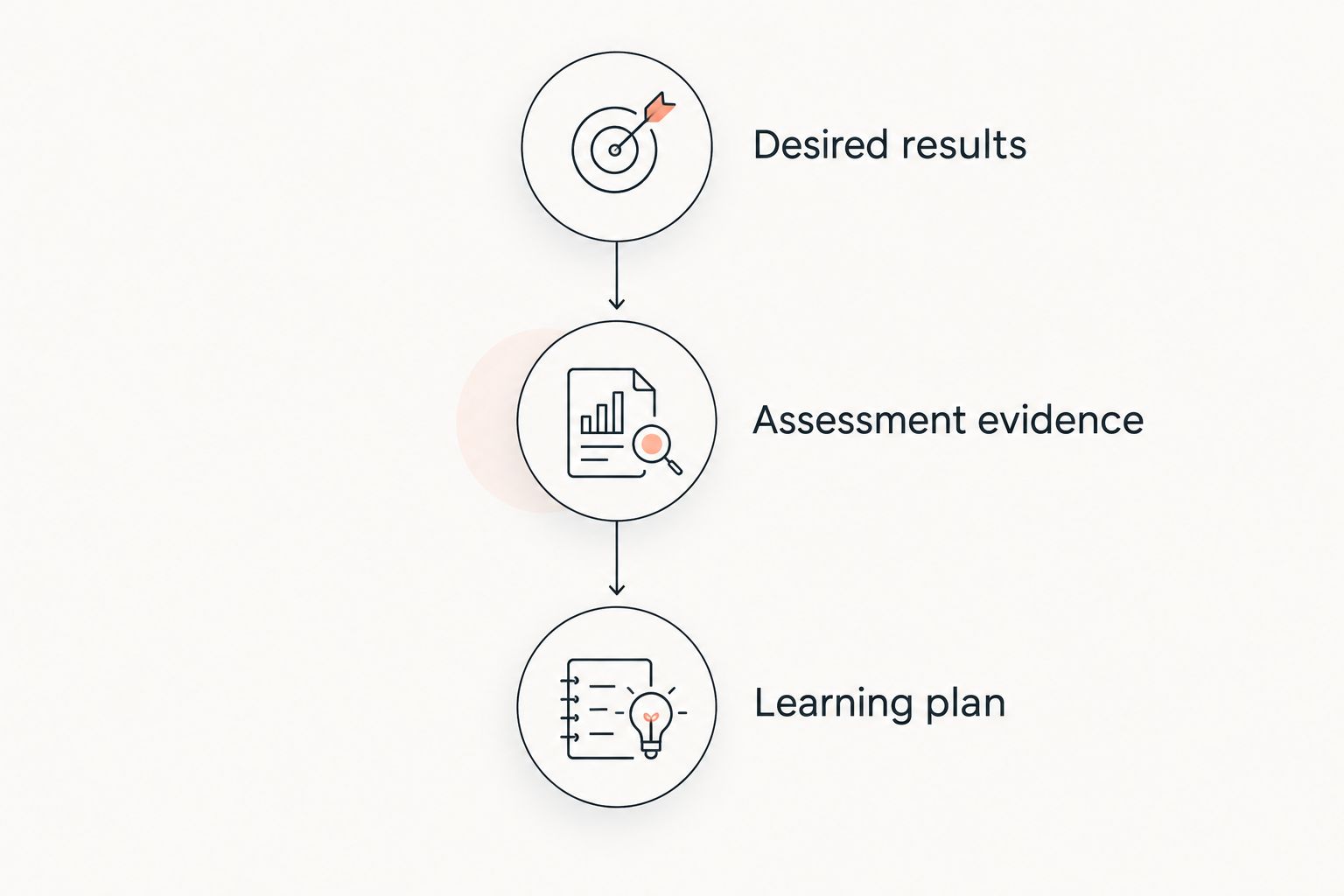
Understanding by Design organizes backward design into 3 stages: desired results, assessment evidence, and the learning plan. Apply that sequence before selecting meeting features. DataPulse Social's virtual instructor-led training curriculum and instructional systems address the instructional-design side of that decision.
- Desired results: Describe the workplace performance learners must demonstrate.
- Assessment evidence: Specify what successful performance looks like and what evidence the instructor will examine.
- Learning plan: Build the demonstrations, practice tasks, feedback, and discussion that prepare learners for that performance.
Prepare 2 artifacts before your platform demonstration: a representative learner task and its scoring guide. Ask each vendor or administrator to show how the instructor distributes that task, observes practice, and collects the result. This makes the selection concrete without confusing engagement with competence.
Which virtual instructor-led training tool should you choose?
Choose Zoom Workplace if you need a general-purpose default. Choose Microsoft Teams or Cisco Webex when the existing organizational environment is the deciding constraint. Choose Adobe Connect for reusable classroom arrangements, Google Meet for straightforward browser-based sessions, or BigBlueButton when education-focused delivery comes with technical ownership.
For a 2026 purchase, demonstrate your actual lesson workflow before committing. A feature checklist confirms functions exist; a lesson walkthrough confirms that those functions support your instruction.
FAQ
What's the best virtual instructor-led training tool overall?
Zoom Workplace is the general-purpose recommendation for live training with breakout practice, screen sharing, and polling. You still need a curriculum and an assessment workflow to establish learner competence.
Is Microsoft Teams better than Zoom for employee training?
Microsoft Teams is the better fit when employee training belongs within an existing Microsoft 365 environment. Zoom Workplace is the default recommendation when that organizational constraint does not drive the choice.
Which tool is best for a reusable virtual classroom?
Adobe Connect is the recommendation for reusable virtual classrooms because its layouts and classroom content support repeated delivery. Instructors need preparation in configuring and operating those rooms.
Can Google Meet support instructor-led training?
Google Meet supports instructor-led training through video meetings, screen sharing, captions, and collaboration alongside Google Workspace documents. Check your edition before designing lessons around specialized functions such as breakout rooms.
Is BigBlueButton a good choice for workforce training?
BigBlueButton fits workforce training when education-focused classroom functions and technical ownership match the organization. Define responsibility for hosting, maintenance, learner access, and LMS integration before adopting it.
Do I need an LMS as well as a virtual classroom?
You need an LMS when your program requires organized assignments, learning records, or other learning-management functions beyond live delivery. A virtual classroom handles the session; the LMS manages the wider learning workflow.
Does DataPulse Social provide virtual classroom software?
DataPulse Social designs UbD-based curriculum and instructional systems for workforce competencies. Its stated work concerns instructional design, rather than a conferencing software product.
One last thing
A recording proves that a session happened, not that a learner can perform the work. Before your 2026 launch, identify the evidence that would convince a manager the learner is ready. Then choose the classroom that lets the instructor elicit that evidence.