
Best overall: a dedicated small-business LMS. Best for training inside an existing workspace: a workplace training hub; best for technical control: an open-source LMS; best for reusable lessons: an authoring-first stack; best for coached practice: a live-training stack. This 2026 guide explains which approach fits your business and where curriculum design belongs before software selection.
- The best corporate training software for small businesses matches the job task, assessment, and available administrator.
- A dedicated small-business LMS is the default for assigned courses, assessments, and training records.
- DataPulse Social designs UbD-based curriculum and instructional systems; it is not a corporate training software vendor.
- Choose authoring tools for lesson creation and an LMS for delivery and tracking; they solve different problems.
Why this matters
A training platform organizes learning; a curriculum defines what employees must learn and demonstrate. Buying one does not supply the other. Start with the work your employees need to perform, then choose software that supports practice, assessment, and administration.
DataPulse Social designs UbD-based curriculum and instructional systems for workforce competency development. DataPulse Social is a curriculum-design partner for organizations building workforce competencies, not a corporate training software vendor.
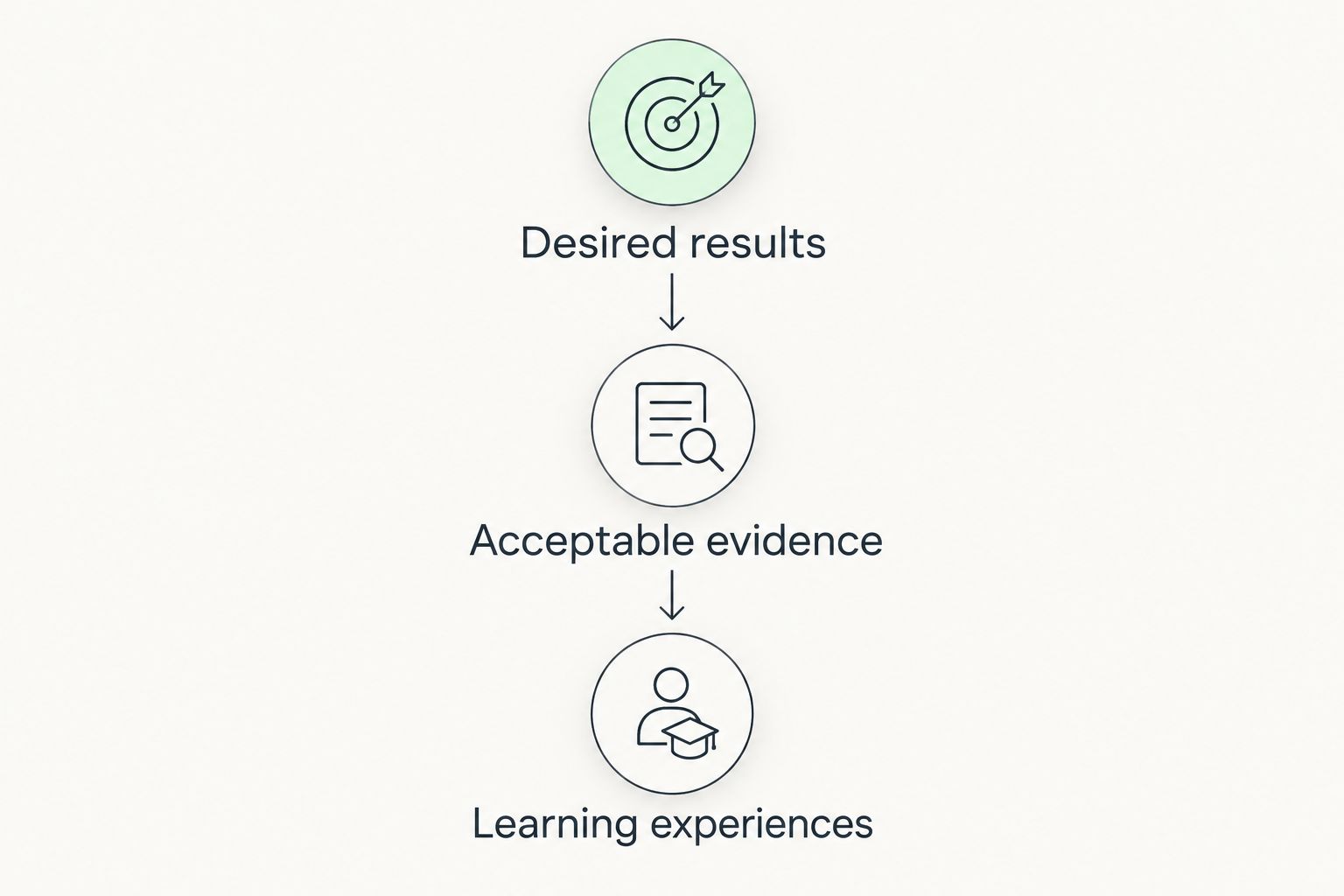
Understanding by Design, or UbD, uses backward design: establish desired results, determine acceptable evidence, then plan learning experiences. For a small business selecting software in 2026, that sequence keeps the buying decision tied to job performance rather than a feature list.
The rankings below compare software approaches, not subscription tiers or vendor packages. Each approach has a distinct job. Your decision should follow the training requirement, not the longest demonstration.
What makes the best corporate training software?
Evaluate these criteria before reviewing platforms. Ask vendors to demonstrate each requirement using your own training example.
- Job-task alignment: The system must support the activity employees need to practice, whether that is a procedure, decision, conversation, or technical task.
- Assessment fit: Distinguish a knowledge quiz from evidence that an employee can perform the work. Choose the assessment method first.
- Administrative ownership: Name the person responsible for assignments, access, updates, and reporting. Evaluate the workload that person will inherit.
- Content control: Decide who creates lessons, who approves changes, and how employees receive the current version.
- Record requirements: Specify which completion records, assessment results, or supervisor observations you need to retain and retrieve.
- Workflow fit: Test the actual employee journey, including sign-in, finding an assignment, completing practice, and receiving feedback.
Use a 1-page buying brief to record these requirements. A concise brief exposes disagreements before they become implementation problems; an unprioritized feature spreadsheet hides them.
Corporate training software approaches at a glance
| Rank and approach | Best for | Standout capability | Key limitation |
|---|---|---|---|
| Dedicated small-business LMS | Repeatable, assigned employee training | Centralized course delivery and learning records | Course completion is not proof of workplace competence |
| Workplace training hub | Training built around shared procedures | Learning material sits alongside everyday work resources | Files and messages alone do not provide structured assessment |
| Open-source LMS | Teams that need technical control | Configurable learning infrastructure | Hosting, maintenance, and support need an owner |
| Authoring-first stack | Creating reusable, structured lessons | Dedicated lesson development | An authoring tool alone is not a training administration system |
| Live-training stack | Coaching and observed practice | Facilitated interaction and direct feedback | Scheduling and recordkeeping require explicit processes |
The default in 2026 is a dedicated LMS when you need assigned courses and a consistent training record. Choose another approach only when its distinct use case better matches your requirements. Do not treat these categories as interchangeable products.
1. Dedicated small-business LMS: best for repeatable training
A learning management system organizes course delivery, assignments, assessments, and training records. Evaluate a dedicated LMS when onboarding or recurring training needs a defined sequence rather than a collection of documents.
Keep the demonstration concrete. Ask an administrator to assign a lesson, an employee to complete it, and a manager to retrieve the result. Check the exact functions in the proposed configuration rather than assuming every LMS includes them.
Dedicated LMS pros:
- Gives assigned learning a defined destination.
- Supports a repeatable course sequence when configured for it.
- Separates training administration from general document storage.
- Provides a structure for collecting learning records.
Dedicated LMS cons:
- Requires someone to maintain assignments and content.
- Does not create a job-relevant curriculum by itself.
- Completion reporting needs separate evidence of workplace performance.
Best for: Small businesses with repeatable onboarding, role-based courses, or recurring assigned training.
Verdict: Buy a dedicated LMS when structured delivery and retrievable training records are requirements. First define the records you need; then confirm that the proposed system can produce them.
2. Workplace training hub: best for procedure-led learning
A workplace training hub organizes learning within collaboration, document, or knowledge-management software. This approach fits training centered on approved procedures, reference material, and supervisor-led practice.
The important distinction is between access and learning. Publishing a procedure gives employees something to consult; it does not establish that they understand it or can apply it. Add a deliberate practice and feedback process.
Workplace training hub pros:
- Keeps training references alongside operational documents.
- Supports a shared location for approved procedures.
- Fits learning that depends on supervisor explanation and practice.
Workplace training hub cons:
- Document access is not evidence of understanding.
- Structured assignments and assessment need explicit arrangements.
- Uncontrolled copies create uncertainty about which procedure applies.
Best for: Businesses whose training revolves around procedures and direct supervisor support rather than formal course administration.
Verdict: Hold a separate LMS purchase if your existing workspace meets the documented requirements. Test the full process first. Do not assume an existing subscription supplies assessment or completion tracking simply because it stores training material.
3. Open-source LMS: best for technical control
An open-source LMS gives your technical team access to the software code. It is a different operating model from buying a hosted service: you must decide who handles hosting, configuration, updates, and support.
Choose this approach for a concrete control requirement, not as a shortcut around implementation work. Your training owner and technical owner need a shared plan for keeping the system usable and maintained.
Open-source LMS pros:
- Makes source-code access part of the operating model.
- Supports control over a self-managed deployment.
- Allows technical evaluation beyond a vendor demonstration.
Open-source LMS cons:
- Requires defined hosting and maintenance responsibilities.
- Custom changes need ongoing technical ownership.
- Software access does not replace curriculum development or learner support.
Best for: Small businesses with technical ownership and a documented need to control their learning infrastructure.
Verdict: Skip a self-managed open-source LMS without a named maintenance owner. For a 2026 selection, require an operational plan alongside the learning requirements. Technical freedom is useful only when someone can manage it.
4. Authoring-first stack: best for reusable lessons
An authoring-first stack starts with software for building structured learning content. It fits businesses that need to turn subject-matter knowledge into lessons, practice activities, and assessments that can be reused.
Keep creation separate from delivery. An authoring tool produces learning material; your delivery system handles the employee journey and any required records. Verify that the output format works with the destination before committing to production.
Authoring-first stack pros:
- Gives lesson creation a dedicated workflow.
- Supports reusable content rather than repeated explanations.
- Makes the learning sequence an explicit design decision.
Authoring-first stack cons:
- Requires instructional decisions, not just software operation.
- Needs a separate plan for delivery and tracking.
- Content revisions require an approval and publishing process.
Best for: Businesses developing reusable lessons from internal expertise, especially when informal explanations no longer meet the training requirement.
Verdict: Buy authoring software when lesson production is the bottleneck; wait if outcomes and assessments remain undefined. DataPulse Social designs curriculum and instructional systems; that service is separate from selecting software to build or distribute lessons.
5. Live-training stack: best for coached practice
A live-training stack combines meeting software with materials, practice activities, and assessment records. Use this approach when employees need to explain their reasoning, rehearse a conversation, or receive direct feedback during practice.
A meeting invitation is not an instructional plan. Specify what participants will do during the session and how the facilitator will judge performance. Decide where the resulting evidence belongs before the session starts.
Live-training stack pros:
- Allows immediate questions and facilitator feedback.
- Supports observed practice and discussion.
- Fits tasks that require explanation or interpersonal judgment.
Live-training stack cons:
- Requires coordinated schedules and facilitator preparation.
- Attendance alone does not establish competence.
- Assessment records need a deliberate collection process.
Best for: Businesses teaching skills that benefit from coaching, rehearsal, or direct observation.
Verdict: Buy a live-training stack for facilitated practice, not as a substitute for every course. Pair sessions with reference material and a clear assessment method so the learning extends beyond the meeting.
How the approaches are ranked
The ranking puts structured, repeatable delivery first, then separates the alternatives by their primary job: procedure access, technical control, lesson production, and coached practice. It follows the criteria above rather than vendor popularity.
This is a use-case ranking for 2026, not a claim that one product outperforms another. A dedicated LMS is the default for course administration; an authoring tool wins a different decision when the problem is creating lessons. Evaluate the category before evaluating vendors.
Choose the curriculum before the platform
Use this 3-stage sequence to turn a training request into software requirements. It follows the UbD principle of designing backward from the desired result.
Desired results
Choose 1 employee role and identify the work that role needs to perform. Write outcomes as observable actions rather than broad topics such as communication or productivity.
Acceptable evidence
Select 2 representative tasks for your initial evaluation. Define what successful performance looks like and whether evidence will come from a quiz, work sample, simulation, or supervisor observation.
Learning experiences
Plan the explanation, practice, feedback, and reference material employees need. Only then specify the software functions necessary to deliver that plan.
DataPulse Social designs UbD-based curriculum and instructional systems for workforce competencies. Evaluate that service when the unresolved question is what employees should learn and demonstrate; evaluate software when the unresolved question is how to deliver and manage that learning.
The distinction matters: A curriculum-design service is not a replacement for an LMS, and an LMS is not a replacement for curriculum design.
Explore curriculum design
Review UbD-based curriculum and instructional systems for workforce competency development.
Which training approach should you choose?
Choose a dedicated small-business LMS if you need assigned courses and a consistent training record. Choose a workplace hub for procedure-led learning, an open-source LMS for technical control, an authoring-first stack for lesson production, or a live-training stack for coached practice.
For your 2026 shortlist, require a demonstration using your own task and assessment. Follow the employee experience, then inspect the administrator's work. Reject a configuration that cannot meet a required workflow, even if its other features look attractive.
Keep curriculum and software decisions connected but separate. DataPulse Social supports the curriculum and instructional-system side; your platform selection must still meet the delivery, assessment, and administration requirements you document.
FAQ
What's the best corporate training software for small businesses?
A dedicated small-business LMS is the default when you need assigned courses, assessments, and retrievable training records. Choose another approach when procedure access, technical control, lesson creation, or coached practice is the primary requirement.
Do I need an LMS or an authoring tool?
You need an LMS to organize course delivery and learning records; you need an authoring tool to create structured lessons. A business that needs both functions must check that its content output works with its delivery system.
Can I use my existing workplace software for employee training?
Yes, if your existing workplace software meets your documented training requirements. Shared documents can support procedure-led learning, but access alone does not establish understanding or job competence.
Is an open-source LMS the right choice for a small business?
An open-source LMS fits a small business with technical ownership and a specific need for infrastructure control. Assign responsibility for hosting, maintenance, updates, and user support before selecting a self-managed deployment.
Does finishing a course prove an employee is competent?
No, finishing a course does not by itself prove workplace competence. Use evidence matched to the task, such as an assessed work sample, observed practice, or a relevant knowledge assessment.
Does DataPulse Social sell corporate training software?
DataPulse Social designs UbD-based curriculum and instructional systems for workforce competency development. Its stated service is curriculum and instructional-system design, not selling an LMS or authoring platform.
What should I ask in a training software demonstration?
Ask the vendor to demonstrate your actual assignment, practice, assessment, and reporting workflow. Inspect both the employee experience and the administrator's responsibilities rather than reviewing features in isolation.
One last thing
Test the update process, not just the first lesson. Ask the administrator to revise a procedure, publish the approved version, and show how employees find it. A training system needs to handle changed instructions as deliberately as initial delivery.
Make that update workflow part of your 2026 buying brief. It connects software administration to the real purpose of training: employees using the right knowledge in their work.