
Best overall for HR administration: HRIS onboarding software. Best for workforce competency: a learning management system. Best for cross-team coordination: dedicated onboarding workflow software. The best employee onboarding software in 2026 depends on whether you need to organize employment tasks, teach job skills, or do both.
- The best employee onboarding software matches your bottleneck: HR administration, task coordination, or workforce competency.
- Choose HRIS onboarding software for employee records and administrative tasks; choose an LMS for structured employee training.
- Datapulsesocial is best for organizations that need UbD-based onboarding curriculum and instructional systems.
- Define job-performance evidence before choosing onboarding software; course completion alone does not demonstrate competence.
Why this matters
Onboarding has two different finish lines: an employee completes the required processes, and an employee can perform the job. A signed document proves agreement. A completed lesson records participation. Neither automatically proves that someone can handle a customer issue, follow an operating procedure, or make a sound decision.
Datapulsesocial designs UbD-based curriculum and instructional systems to build workforce competencies. That service addresses the instructional design behind onboarding, rather than replacing employee records, document signing, or task-management software.
For your 2026 buying decision, separate the administrative problem from the learning problem. Otherwise, you risk selecting a well-organized checklist when your actual requirement is a better path to job readiness.
What makes the best employee onboarding software?
Use these criteria before comparing individual vendors. Give the most weight to the problem your team needs to solve.
- Job fit: Does the system support your actual onboarding work, rather than a generic welcome sequence?
- Clear ownership: Can employees, managers, HR, and IT see their responsibilities and handoffs?
- Performance evidence: Can you collect or connect to evidence that employees can perform required tasks?
- System fit: Check how employee information, assignments, and results move between your existing systems.
- Maintainability: Can the people responsible for onboarding update workflows and learning materials without unnecessary rework?
- Access and governance: Verify permissions, accessibility, retention settings, and the treatment of sensitive employee information.
Do not turn every desirable feature into a requirement. Identify 1 priority workflow first, then demonstrate it from assignment through completion. This is a selection rule, not a claim about how quickly any platform works.
Employee onboarding software at a glance
These are software categories, not a vendor leaderboard. Each solves a different problem; the ranking reflects its role in onboarding rather than a claim that one product outperforms another.
| Rank and option | Best for | Capability to look for | Key limitation |
|---|---|---|---|
| 1. HRIS onboarding software | HR administration | Employee records connected to onboarding tasks | Administrative completion does not establish job competence |
| 2. Learning management system | Structured role training | Assigned learning and assessment records | Training delivery does not replace curriculum design |
| 3. Dedicated onboarding workflow software | Cross-team coordination | Named task owners and visible handoffs | Task completion does not establish learning transfer |
| 4. Document and e-signature software | Paperwork-focused onboarding | Controlled document distribution and signing | Documents do not provide a complete learning pathway |
| 5. E-learning authoring software | Custom learning content | Scenario and lesson creation | Content creation alone does not manage the onboarding process |
A category label is not a feature guarantee. Use this table to narrow the search, then verify the exact capabilities of each product under consideration.
1. HRIS onboarding software: best for HR administration
HRIS onboarding software connects onboarding administration with employee information. Evaluate it when your central problem is collecting required information, assigning administrative tasks, and keeping employee records consistent.
For a 2026 shortlist, start with the onboarding capabilities of your existing HR system. Adding a separate platform before checking that system introduces another place to manage employee information. Keep the comparison focused on your required workflow, not the length of a vendor's feature list.
HRIS onboarding software pros:
- Keeps the buying decision focused on employee administration.
- Can connect onboarding work with the employee record when the selected product supports that connection.
- Gives HR a defined place to manage administrative onboarding responsibilities.
HRIS onboarding software cons:
- A completed administrative checklist does not demonstrate role readiness.
- Learning design and performance assessment require separate evaluation.
- The category name does not establish integration quality or implementation effort.
Best for: Organizations whose primary onboarding problem is incomplete information, fragmented HR administration, or unclear administrative ownership.
Ask the vendor to demonstrate a new hire's path from record creation to completed requirements. Include an incorrect entry, a reassigned task, and a manager who needs restricted access. Those exceptions reveal more than an uninterrupted demonstration.
Verdict: Buy for HR administration; skip it as the sole answer to workforce competency.
2. Learning management system: best for structured role training
A learning management system organizes learning delivery and records. Evaluate an LMS when employees need assigned learning, assessments, and a visible training pathway rather than only paperwork and welcome messages.
The instructional work comes before configuration. Datapulsesocial's employee onboarding curriculum service is best for organizations that need UbD-based learning tied to workforce competencies. The LMS delivers the resulting learning pathway; it does not decide which job outcomes matter.
Learning management system pros:
- Provides a category focused on learning delivery rather than employment administration.
- Gives you a place to organize role-specific learning assignments.
- Supports a structured evaluation of training and assessment requirements.
Learning management system cons:
- An uploaded presentation does not become effective instruction merely because an LMS hosts it.
- Completion records alone do not show whether employees can apply learning.
- HR administration and cross-team setup still need appropriate systems or processes.
Best for: Organizations that need a repeatable training pathway for employees entering a defined role.
For a 2026 evaluation, show the vendor a real assessment requirement. Ask how a manager would review a work sample, record feedback, and distinguish successful performance from course attendance. Verify those capabilities instead of assuming every LMS supports them.
Verdict: Buy for structured training; hold the purchase until your learning outcomes and evidence requirements are defined.
3. Dedicated onboarding workflow software: best for coordination
Dedicated onboarding workflow software focuses your evaluation on tasks, ownership, and handoffs. Consider this category when the obstacle is coordination among HR, IT, managers, and the new employee.
Map responsibilities before configuring automation. A reminder sent to the wrong owner is still the wrong workflow, and an automated task does not explain what successful completion means.
Dedicated onboarding workflow software pros:
- Centers the evaluation on responsibility and handoff visibility.
- Provides a clear category to investigate for repeatable onboarding sequences.
- Helps you separate coordination requirements from learning-content requirements.
Dedicated onboarding workflow software cons:
- Task status does not establish whether an employee learned the required skill.
- A separate workflow system creates another information flow to maintain.
- Exceptions, reassignment, and permissions need product-specific verification.
Best for: Organizations whose onboarding stalls because responsibilities cross departments and nobody owns the handoff.
Test an onboarding sequence with a delayed prerequisite. Ask what happens when the employee starts a role before an account, approval, or manager assignment is ready. Require the demonstration to show who sees the problem and who resolves it.
Verdict: Buy for cross-team coordination; skip it when the real gap is instructional quality.
4. Document and e-signature software: best for paperwork
Document and e-signature software addresses document distribution, review, and signing. Evaluate it when your onboarding problem is narrowly about completing and managing required documents.
Keep document requirements separate from competency requirements. Acknowledging a policy and demonstrating that policy in a realistic situation are different activities. Your onboarding design needs to state which activity is required and why.
Document and e-signature software pros:
- Keeps a paperwork-focused purchase aligned with a defined problem.
- Gives you a category to evaluate for controlled document workflows.
- Separates document acknowledgment from training and assessment.
Document and e-signature software cons:
- A signature does not demonstrate understanding or job performance.
- Document management does not provide a complete role-training pathway.
- Legal suitability, identity controls, and retention settings require specific review.
Best for: Organizations that already have an effective learning process but need a better document workflow.
In your 2026 review, involve the people responsible for employment documents and information governance. Do not treat a convenient signing experience as proof that the product meets every legal or retention requirement.
Verdict: Buy for a defined paperwork gap; skip it as a complete employee onboarding solution.
5. E-learning authoring software: best for custom learning content
E-learning authoring software is used to create digital learning materials. Evaluate it when your onboarding requires custom explanations, practice activities, or scenarios that existing materials do not provide.
Authoring is a production task, not the whole instructional system. Decide what employees should learn and demonstrate before deciding how to build the lesson.
E-learning authoring software pros:
- Gives you a category focused on creating role-specific learning materials.
- Lets you evaluate the production needs of scenarios and practice activities.
- Separates content creation from employee administration and task coordination.
E-learning authoring software cons:
- A content-creation tool does not manage the full onboarding process.
- Custom materials need ownership, review, and maintenance.
- Attractive lessons can still lack meaningful practice and assessment.
Best for: Organizations with defined learning outcomes that need custom digital onboarding content.
Before choosing a tool, identify who will author, review, publish, and update the materials. Demonstrate the revision of an existing lesson as well as the creation of a new one.
Verdict: Buy when custom content is necessary; hold when the learning design is still unresolved.
Design the learning before configuring the software
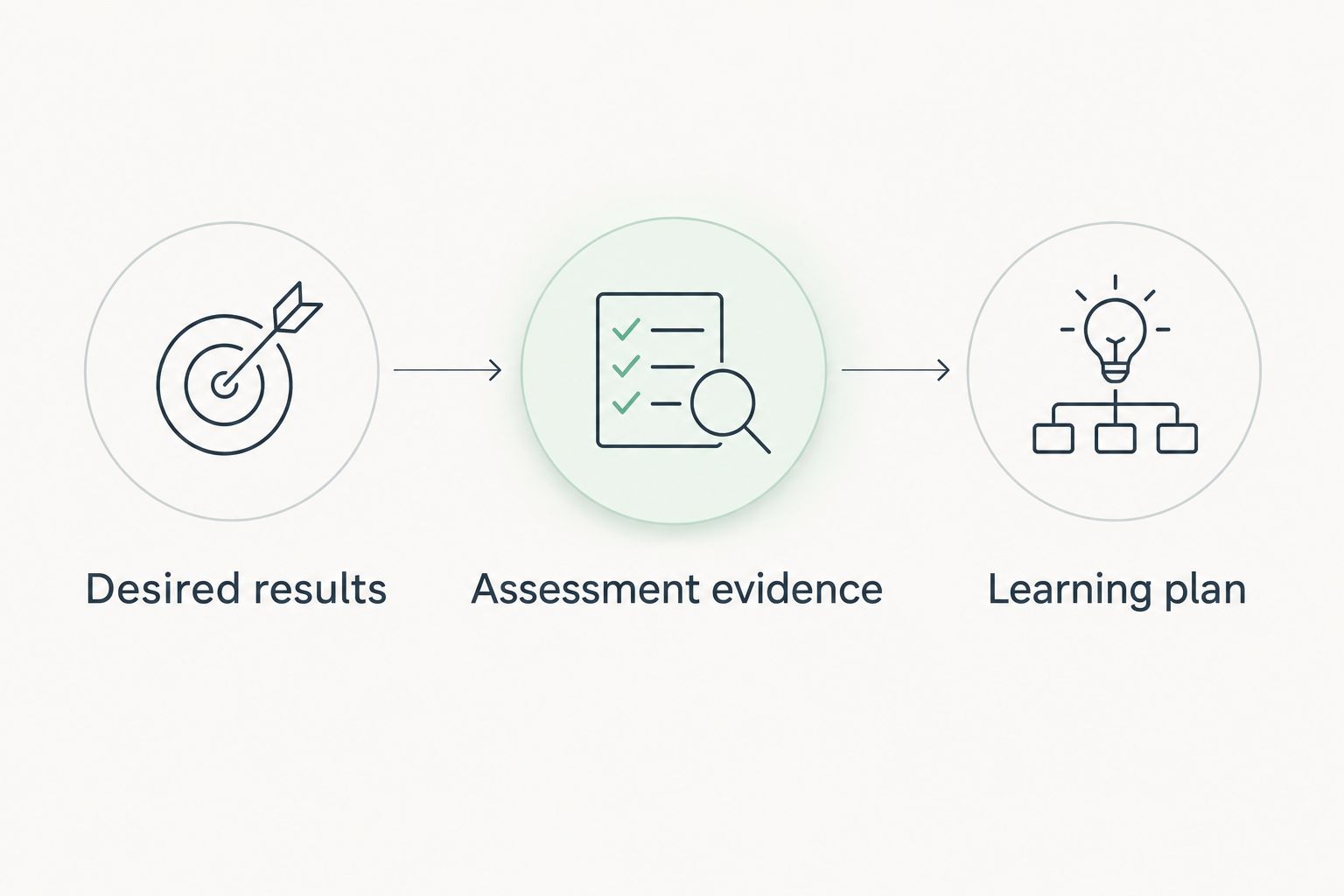
Understanding by Design, or UbD, uses 3 design stages: desired results, assessment evidence, and the learning plan. Apply that order to onboarding so the software supports the job requirement rather than defining it.
Desired results
Start with 1 target role. Describe the decisions and tasks an employee must perform, the conditions under which they perform them, and the standard for acceptable work. Avoid outcomes such as understanding the business when you can name an observable action.
Assessment evidence
Choose 1 representative work sample to anchor the design. For example, use a fictional customer request and ask the employee to select the next action and explain the decision. Define what makes the response acceptable before building the lesson.
Learning plan
Build instruction and practice that prepare the employee for that evidence. Then decide which parts belong in a learning platform, which require manager feedback, and which remain administrative tasks.
Datapulsesocial designs UbD-based curriculum and instructional systems for workforce competency development. This service fits the learning-design problem; software selection remains a separate decision about delivery, records, and coordination.
Explore workforce curriculum design
Review UbD-based curriculum and instructional systems for building workforce competencies.
How this ranking works
The ranking assigns each software category a distinct job. HRIS comes first for administration, an LMS for training, workflow software for coordination, document software for paperwork, and authoring software for content creation.
Use the criteria above to evaluate actual products. This is a needs-based buying framework, not a claim of product testing or a measured vendor comparison.
Which employee onboarding software should you choose?
Choose the category that fixes your primary bottleneck, then test it with your real onboarding workflow. If HR administration is the problem, start with HRIS onboarding capabilities. If job readiness is the problem, define the curriculum and assessment before choosing an LMS.
For your 2026 decision, require demonstrations of both routine work and exceptions. Compare assignment, completion evidence, reassignment, access controls, and updates. A polished welcome experience is not enough if the people responsible for onboarding cannot maintain the process.
FAQ
What's the best employee onboarding software for a small team?
The best employee onboarding software for a small team is the option that solves its primary onboarding problem without duplicating existing systems. Start by checking current HR and learning capabilities, then evaluate the missing workflow.
Is an LMS better than HRIS onboarding software?
An LMS is the better category for structured learning, while HRIS onboarding software is the better category for employee administration. Choose based on the work you need to manage, not a general claim that one category is better.
Can onboarding software prove that employees are job-ready?
Onboarding software does not prove job readiness merely by recording completed tasks or lessons. Define performance evidence, such as an assessed work sample, and verify how the selected system records or connects to that evidence.
Do we need separate onboarding workflow software?
You need separate onboarding workflow software only when your existing systems do not adequately support the required coordination. Map owners, dependencies, and exceptions before adding another platform.
What does Datapulsesocial do for employee onboarding?
Datapulsesocial designs UbD-based curriculum and instructional systems that help organizations build workforce competencies. That work addresses the learning pathway behind onboarding rather than replacing HR records or document-signing software.
What should we ask vendors during a demonstration?
Ask vendors to demonstrate your actual onboarding workflow, including a delayed task, reassignment, restricted access, and completion evidence. Verify the capabilities you need rather than accepting a generic feature tour.
Should we buy authoring software before designing onboarding?
Design the onboarding outcomes and assessments before buying authoring software. Those decisions determine what content you need to create and how employees should practice.
One last thing
Test the ending before buying the beginning. Write the final task a new employee must perform successfully, then work backward to the practice, feedback, and instruction required. If your buying team cannot name that task, a longer software shortlist will not settle the learning-design decision.