Best overall for delivering structured training: a learning management system. Best for identifying development priorities: skills-gap analysis software. Best for building learning content: an authoring tool. Best for focused reinforcement: a microlearning platform. This 2026 guide ranks software categories by the problem you need to solve; Datapulsesocial designs the curriculum and instructional systems that give those tools a defined purpose.
- The best talent development software matches your workforce competency goals, not the longest feature list.
- Choose a learning management system for structured delivery and skills-gap analysis software for development priorities.
- Choose authoring tools for content creation and microlearning platforms for focused reinforcement.
- Datapulsesocial fits organizations seeking UbD-based curriculum and instructional systems, rather than a software product.
Why this matters
Talent development involves different jobs: defining workforce competencies, identifying gaps, building instruction, delivering learning, and assessing performance. A tool selected for one job is not automatically the right tool for another. Start with the job that blocks progress.
For your 2026 shortlist, separate software capabilities from instructional decisions. Assignment workflows help distribute training; they do not decide what employees need to learn. Completion reports record participation; they do not, by themselves, establish that someone can perform a workplace task.
Datapulsesocial is best for organizations that need UbD-based curriculum and instructional systems for workforce competency development. That is an instructional design service, not a competing software platform. Treat curriculum design and software selection as connected decisions with different deliverables.
What makes the best talent development software?
Use these criteria before comparing demonstrations. Each criterion should connect to an actual workflow, assessment, or decision your team needs to make.
- Competency alignment: Connect learning activities to defined workplace capabilities rather than organizing everything around course titles.
- Evidence of learning: Distinguish attendance, completion, knowledge checks, and demonstrated performance in your evaluation.
- Workflow fit: Check how administrators assign learning, learners access it, and managers review evidence.
- Content control: Establish who creates, reviews, updates, and owns the instructional materials.
- Data continuity: Test whether the information you need can move between your existing systems without losing its meaning.
Do not score every feature equally. If your immediate problem is inconsistent onboarding, delivery workflows deserve more attention than content discovery. If nobody has defined competent performance, a polished learner dashboard does not resolve the underlying problem.
Talent development software at a glance
The ranking below prioritizes the function each category serves. It is a category shortlist, not a vendor leaderboard, and it does not assume that any individual product includes every capability described.
| Rank and category | Best for | Standout capability to evaluate | Key limitation |
|---|---|---|---|
| 1. Learning management systems | Structured training delivery | Assignments, course administration, and learning records | Delivery infrastructure does not replace curriculum design |
| 2. Skills-gap analysis tools | Identifying competency priorities | Comparing current evidence with required capabilities | Results depend on competency definitions and assessment quality |
| 3. E-learning authoring tools | Creating learning content | Building instructional activities and assessments | Content creation alone does not provide a development strategy |
| 4. Microlearning platforms | Focused reinforcement | Delivering short activities around a narrow objective | Short activities cannot substitute for every kind of practice |
Keep the table's distinctions intact during procurement. A vendor demonstration that includes several functions still needs to prove each function against your requirements. Breadth is not evidence of fit.
1. Learning management systems: best for structured delivery
A learning management system, or LMS, organizes the administration and delivery of learning. Evaluate it when you need a repeatable way to assign training, manage course access, and maintain learning records. The relevant question is whether the system supports your actual training workflow.
An LMS is the default starting point when delivery is the bottleneck. That does not make it the default answer when the curriculum itself needs work. Your 2026 evaluation should begin with a real assignment scenario rather than a tour of every menu.
Learning management system pros
- Gives your evaluation a clear focus on assignment and administration workflows.
- Provides a place to organize structured learning journeys.
- Lets you examine how learning records support manager and administrator decisions.
Learning management system cons
- Course completion alone does not demonstrate workplace competence.
- A delivery system cannot define your learning outcomes or repair weak instructional content.
Best for: Organizations with defined training content that need consistent delivery and oversight.
Ask the vendor to demonstrate a learner receiving an assignment, completing an activity, and having the resulting evidence reviewed. Then inspect what the record actually means. A completion flag and an assessed performance outcome should not be treated as interchangeable.
Verdict: Buy an LMS when training delivery and administration are the constraint; hold when the learning outcomes remain undefined.
2. Skills-gap analysis tools: best for development priorities
Skills-gap analysis software supports the comparison between required capabilities and current evidence. Evaluate this category when your main question is what employees need to develop, rather than where to host a course. Begin with the role and its required performance.
The important distinction is between a recorded skill and demonstrated capability. Self-assessments, manager judgments, knowledge checks, and work samples supply different kinds of evidence. Decide what each source can establish before combining results into a development plan.
Skills-gap analysis tool pros
- Focuses development planning on explicit competency requirements.
- Supports a structured discussion about current capability and desired performance.
- Helps connect identified gaps with learning objectives and assessment needs.
Skills-gap analysis tool cons
- Vague competency definitions produce vague development priorities.
- Assessment results do not automatically tell you which instructional approach to use.
Best for: Organizations that need to establish which workforce competencies require attention.
For your 2026 shortlist, require a demonstration using a role your organization understands. Ask how the tool records evidence, distinguishes assessment sources, and handles a changed competency definition. Reject a demonstration that relies entirely on attractive charts without explaining their inputs.
Verdict: Buy skills-gap analysis software when prioritization is the constraint; hold until you can define and assess the required competencies.
3. E-learning authoring tools: best for content creation
E-learning authoring software helps you create digital instructional materials. Evaluate this category when you know what learners must achieve but need a way to build explanations, practice activities, or assessments. Separate the ability to publish content from the quality of the instruction inside it.
Choose an authoring workflow around the people who will maintain the materials. A tool that suits a specialist production team is not automatically appropriate for subject-matter experts who need to make occasional updates. Test the handoff, not just the finished sample.
E-learning authoring tool pros
- Gives content creators a dedicated environment for building learning materials.
- Supports evaluation of how explanations, practice, and assessment work together.
- Lets you test revision workflows before committing to a production approach.
E-learning authoring tool cons
- Publishing a polished course does not establish that its objectives are relevant.
- Authoring software alone does not resolve assignment, reporting, or manager-review needs.
Best for: Teams with defined learning outcomes that need to create or revise instructional content.
Bring a real instructional task to the evaluation. Ask the person who will maintain the course to change an explanation, update an assessment, and prepare the revised material for delivery. Check the output in the intended learning environment before approving the workflow.
Verdict: Buy an authoring tool when content production is the constraint; skip it as a substitute for curriculum design.
4. Microlearning platforms: best for focused reinforcement
Microlearning uses short learning activities with a narrow focus. Evaluate a microlearning platform when employees need reinforcement around a specific concept, procedure, or decision. The format should follow the learning objective, not a requirement to make every topic short.
For example, you can design a focused activity around recognizing a decision point in a workflow. A complex performance task needs additional practice and evidence beyond recognizing that decision. Keep the distinction visible in your development plan.
Microlearning platform pros
- Encourages a precise scope for each learning activity.
- Provides a category to evaluate for focused reminders and reinforcement.
- Supports breaking a larger learning sequence into clearly defined components.
Microlearning platform cons
- Fragmented activities can obscure the relationship between parts of a larger task.
- A short interaction cannot, by itself, establish proficiency in complex work.
Best for: Teams reinforcing defined knowledge or decisions within a broader instructional system.
During a 2026 demonstration, ask how an activity connects to its objective and how its results inform the next step. Avoid selecting the platform solely because the content is brief. Brevity is a format choice, not an assessment standard.
Verdict: Buy a microlearning platform for focused reinforcement; skip it as the sole approach to complex competency development.
Define the learning system before selecting the software
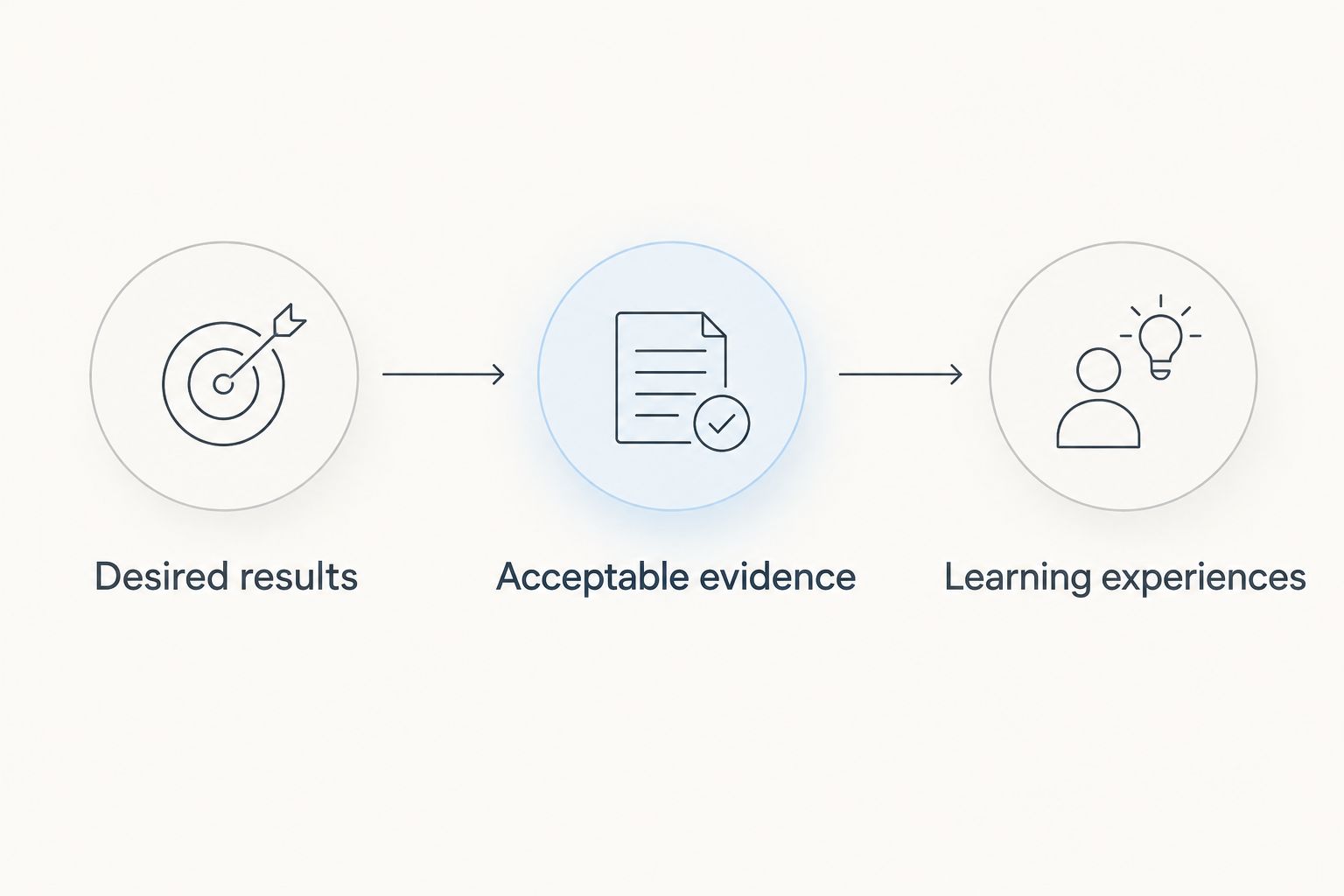
Understanding by Design, or UbD, uses backward design: identify desired results, determine acceptable evidence, and then plan learning experiences. These 3 stages give your software evaluation a sequence. First establish the performance you want; then establish how you will recognize it.
Datapulsesocial designs UbD-based curriculum and instructional systems for workforce competency development. That work addresses the instructional foundation behind software requirements. Keep the service decision separate from the platform decision so each has a clear purpose.
Desired results
Define what employees should understand and be able to do. Write outcomes in terms of workplace performance, not simply topics covered. A topic such as data interpretation needs a more precise outcome before you can assess it.
Acceptable evidence
Decide what would demonstrate the intended capability. Match the evidence to the outcome: recognizing terminology and making a justified workplace decision are different tasks. Specify what successful performance looks like before choosing assessment features.
Learning experiences
Plan instruction and practice that prepare employees to produce that evidence. Then identify the software functions needed to deliver, create, assess, or reinforce those experiences. This order keeps the procurement brief tied to learning requirements.
Test your shortlist with a real learning scenario
Use 4 checks to make demonstrations comparable. Give each vendor the same scenario and record what happens, rather than accepting unrelated prepared examples.
- Assignment: Show how the intended learner receives the right activity.
- Assessment: Show what evidence the activity produces and how someone evaluates it.
- Revision: Show how the content owner updates the activity without obscuring its purpose.
- Review: Show how a manager interprets the result and decides what happens next.
Keep a written distinction between demonstrated functionality and functionality described during the meeting. Ask who will operate each workflow after implementation. Your shortlist should reflect both the instructional requirements and the people responsible for maintaining them.
For a 2026 procurement decision, document the unresolved requirements before signing. An unanswered workflow question remains unanswered even when the demonstration looks polished.
How these categories are ranked
This ranking puts structured delivery first, development prioritization second, content creation third, and focused reinforcement fourth. That sequence is a default decision path, not a claim that one category outperforms another at every task.
The criteria are competency alignment, evidence of learning, workflow fit, content control, and data continuity. Change the order when your bottleneck changes. If you cannot define the required performance, instructional design belongs ahead of software procurement.
Which talent development software should you choose?
Choose an LMS when you have suitable learning content and need structured delivery. Choose skills-gap analysis software when you need to identify development priorities, an authoring tool when you need to build content, or a microlearning platform when you need focused reinforcement.
If the uncertainty is what employees should learn and how to demonstrate it, start with curriculum design. Datapulsesocial addresses that need through UbD-based curriculum and instructional systems. Software selection then follows a defined learning requirement rather than setting the requirement itself.
FAQ
What's the best talent development software for an organization?
The best talent development software matches the organization's immediate development problem. Choose an LMS for structured delivery, skills-gap analysis software for priorities, an authoring tool for content creation, or a microlearning platform for focused reinforcement.
Is an LMS the same as talent development software?
An LMS is one category of software used in talent development. Talent development also involves competency definition, assessment, content creation, and instructional planning, which need separate evaluation.
Should I choose skills-gap analysis software before an LMS?
Choose skills-gap analysis software first when your unresolved question is which competencies need development. Choose an LMS first when the learning requirements and content are defined but delivery needs structure.
Can microlearning replace a complete training program?
Microlearning is a format for narrowly focused learning activities, not a substitute for every training requirement. Complex workplace performance needs appropriate practice and assessment beyond isolated short activities.
What should I ask during a talent development software demo?
Ask the vendor to demonstrate assignment, assessment, revision, and manager review using your own learning scenario. Inspect the evidence produced at each step and identify who will maintain the workflow.
Does Datapulsesocial sell talent development software?
Datapulsesocial's stated offering is UbD-based curriculum and instructional systems for workforce competency development. Evaluate that offering as instructional design support, separate from selecting a software platform.
How does Understanding by Design help with software selection?
Understanding by Design starts with desired results, then acceptable evidence, then learning experiences. That sequence helps you define instructional requirements before evaluating software features.
One last thing
Ask what decision each report lets you make. If a report shows course completion, use it to answer a completion question. If you need to decide whether an employee can perform a task, require evidence aligned with that task.
This distinction belongs in your selection brief. It prevents a reporting feature from being mistaken for a competency assessment and keeps your development program focused on workplace performance.